Communication history
Communication history is the full audit log of everything CrewSheet has sent — every schedule notification and announcement, who received it, and whether it went through.
Read the list
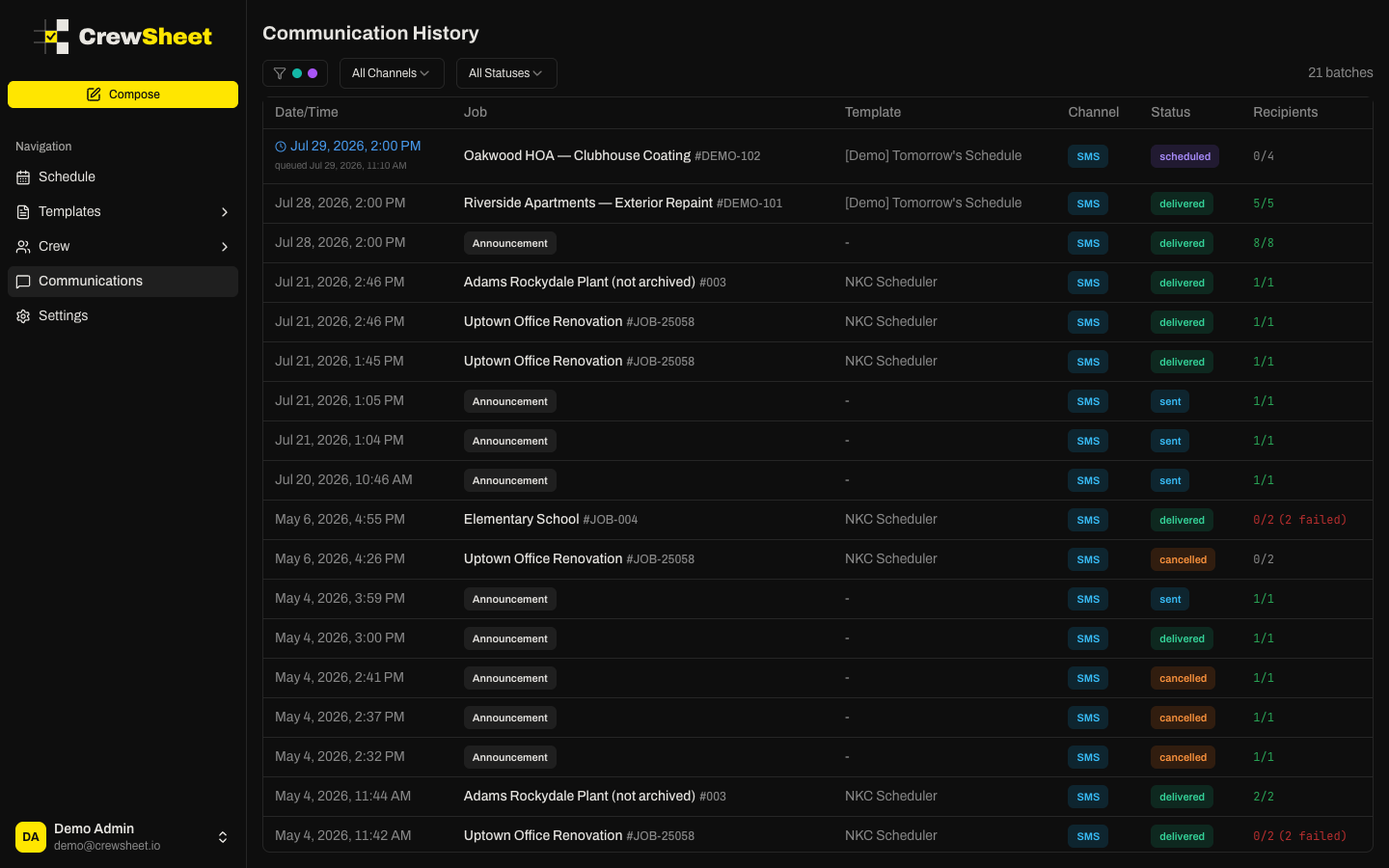
Each row is one send (a "batch"):
- Date/Time — when it sent, or the planned time for a scheduled send (shown with a clock icon).
- Job — the job it was for, or an Announcement label for general messages.
- Template — the template used.
- Channel — SMS or email.
- Status — sent, scheduled, cancelled, or failed.
- Recipients — how many delivered out of the total, with failures called out in red.
Filter
Use the filters at the top to narrow the list by division, channel, or status — for example, show only failed sends, or only what went to one division.
Open a send
Click any row to see its detail: the job and template used, the channel, overall delivery counts, and a per-crew-member table. Each row shows that person's phone, email, and delivery status — click a row to expand the exact message they received.
From a scheduled batch you can still Reschedule or Cancel send here — see Scheduled sends.
Delivery status
CrewSheet communication is one-way — crew don't need to reply or confirm. Statuses here reflect delivery only, so you can spot a bad phone number or a failed text and follow up.