Small Contractor Scheduling App With Universal SMS
Small Contractor Scheduling App With Universal SMS
Copy-pasting schedules into group texts wastes hours each week and makes crews show up late or not at all. A small contractor scheduling app with universal sms is scheduling software that sends one-way SMS job notices to every crew member without requiring field-worker logins. This article compares scheduling apps that send crew schedules by SMS for small construction contractors, with links to our blog.
CrewSheet replaces spreadsheets and group texts with a drag-and-drop day board and pre-formed SMS templates; see sending the schedule for how texts go out in about 30 seconds. We'll start from zero, explain the costs of DIY workflows, and show how CrewSheet's one-way SMS flow and PTO visibility cut scheduling errors. Which features save time for a 10–30 person trades crew?
What are the fundamentals of a small contractor scheduling app with universal SMS?
A small contractor scheduling app with universal SMS is a day-focused scheduling tool that assigns crews, respects PTO, and sends outbound SMS to crew members without requiring field-worker logins. This matters for trades where jobs are full-day and crews rotate sites, because the scheduler usually only needs to set a start time and notify people by text. Expect the scheduling view, crew pool, PTO visibility, and reliable outbound SMS (with carrier compliance) as the baseline when comparing vendors.
What is a day board scheduling model? 📋
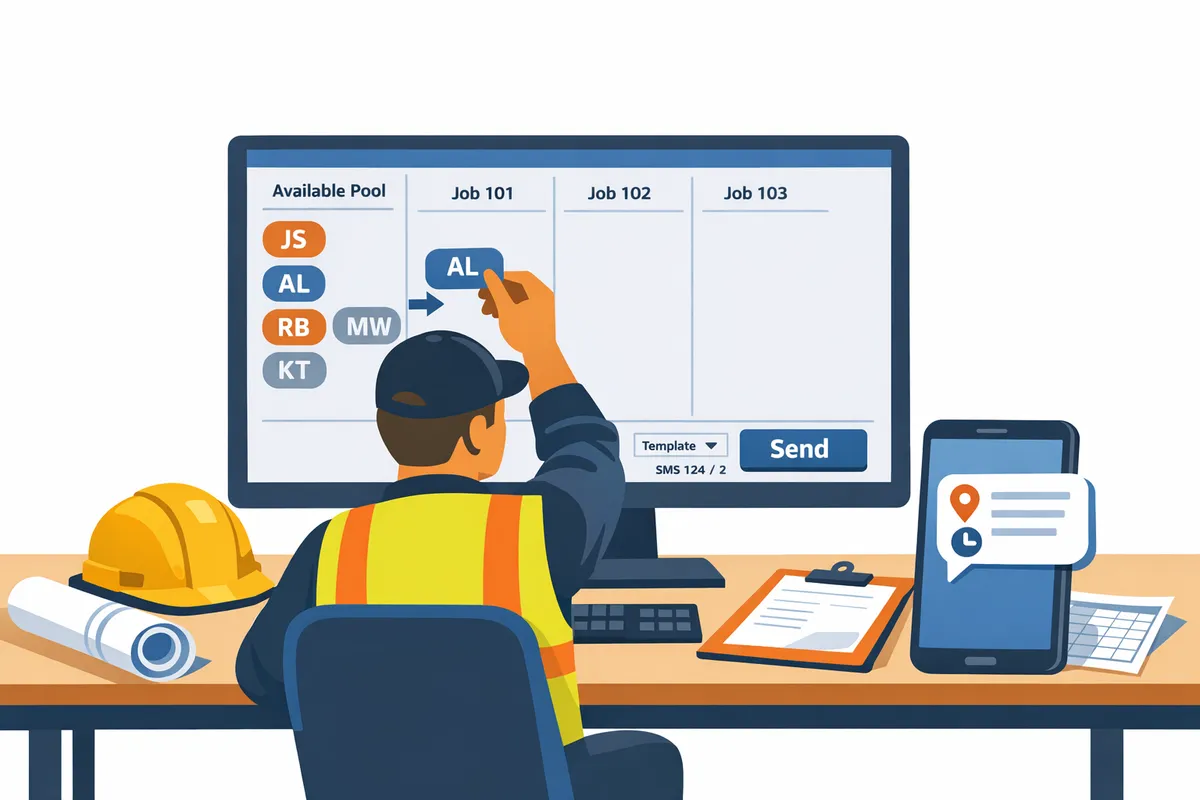
A day board scheduling model displays jobs as full-day cards for a single date where only the start time usually matters. A coatings crew that moves between plants or facilities benefits from this model because crews are assigned to a site for the day and drag-and-drop assignment makes rebalancing simple. For example, an operator can drag three names from the available pool into a job card, see the ideal crew size, then drag a foreman into a different card if the day changes.
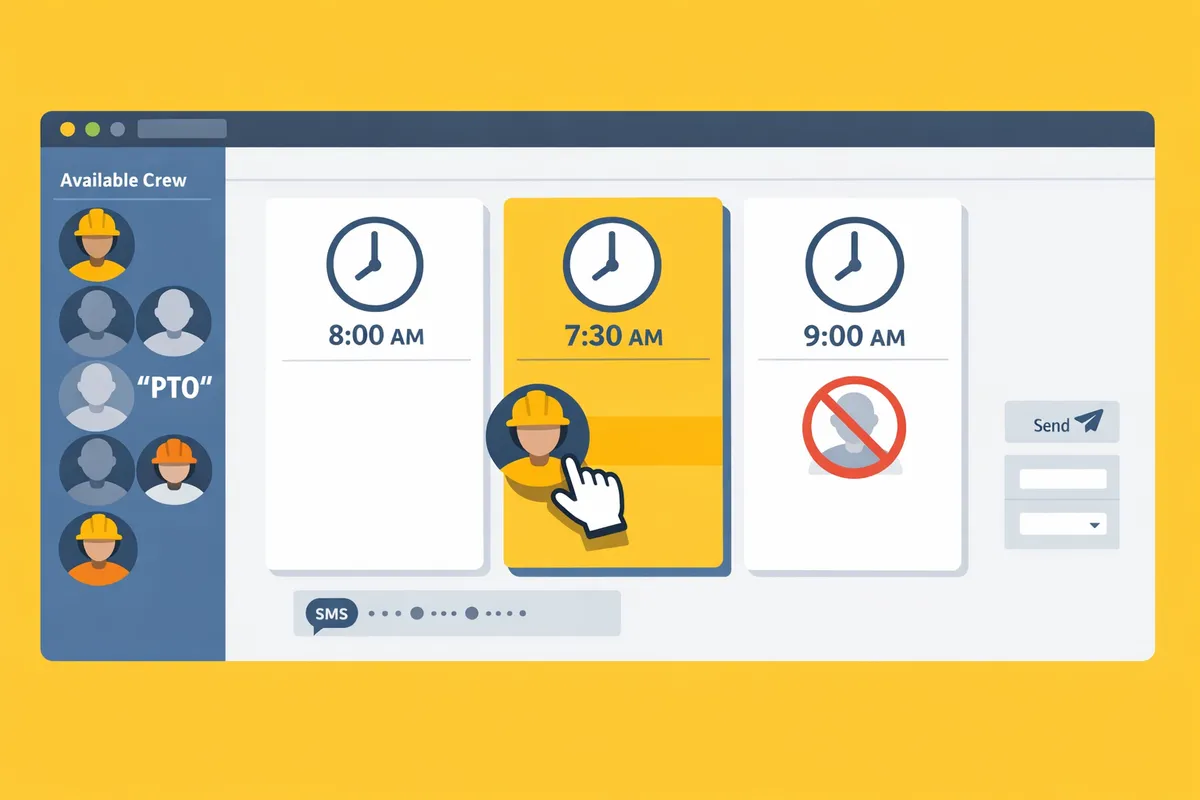
CrewSheet uses a drag-and-drop day board that prevents double-booking and shows PTO in the pool so you do not accidentally schedule someone on their day off. See our guide to the schedule board and read more about day-focused scheduling in our crew scheduling primer on the blog.
What does 'universal SMS' mean for small crews? 📤
Universal SMS means sending outbound texts to any phone number so crew receive assignments without creating accounts or installing apps. This increases reach because every crew member gets a plain-text SMS on the device they already carry, which reduces missed messages compared with app-only notifications. Universal SMS also requires carrier-compliant registration (10DLC A2P) when you send bulk schedule messages to avoid delivery blocks.
CrewSheet sends schedule texts without forcing field workers to sign in, and the product includes A2P 10DLC registration to reduce the risk of carrier filtering. For a vendor comparison, read our evaluation of SMS dispatch tools and our sending-the-schedule documentation to confirm how each supplier handles campaign registration, throughput limits, and delivery reporting.
💡 Tip: Confirm a vendor handles 10DLC A2P registration and campaign approvals on your behalf. DIY registration often causes delays or rejected campaign setups.
Which scheduling primitives should I expect? ⚙️
Scheduling primitives are the core elements like job cards, the available crew pool, PTO flags, and single-use enforcement that prevent common errors such as double-booking. These primitives map directly to business outcomes: visible PTO prevents sending people to work on leave, single-use rules stop one worker from being assigned to two sites the same day, and per-job ideal crew sizes help you spot under- or over-staffing at a glance.
| Primitive | What it prevents | How CrewSheet implements it |
|---|---|---|
| Job card | Losing job context or start-time confusion | Full-day cards with optional start-time and address |
| Crew pool | Accidentally assigning unavailable staff | Day-scoped pool; PTO shows grayed-out with labels |
| PTO flag | Scheduling someone on leave | PTO visibility on the selected date with block or warning |
| Single-use rule | Double-booking one person | Single-use enforcement prevents same-day duplicate assignments |
CrewSheet ties these primitives into the day board so the operator sees immediate feedback while building the schedule. If your current workflow uses Google Sheets, these primitives are the difference between fragile copy-paste and a controlled scheduling loop; read our post on crew scheduling software for construction trades for a deeper comparison.
Minimum communications features to compare 📬
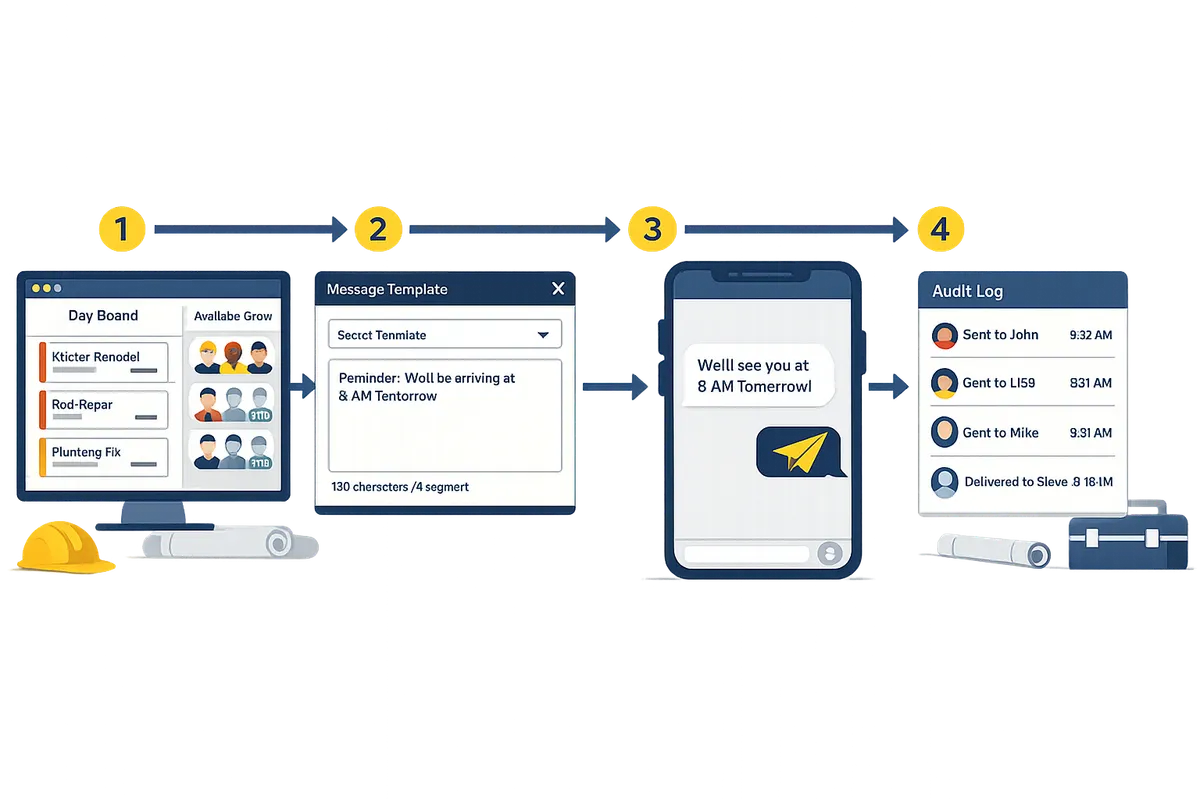
Minimum communications features you should require are per-job SMS templates, a live SMS character and segment counter, outbound-only delivery, and an audit log of sends and delivery status. Templates reduce mistakes from ad-hoc edits, the live counter prevents multipart billing surprises, and an audit log gives you an evidentiary trail when a crew claims they never got a message.
When evaluating vendors check these specifics:
- Template safety. Templates should be selectable (not fragile free text) and allow controlled placeholders for job name, address, and start time.
- Live segment counter. Carriers bill by segment; a visible counter prevents unexpected costs for long messages.
- Delivery audit. You need timestamps and delivery status for every recipient to troubleshoot missed crew notifications.
- Billing model. Ask whether the vendor charges per message or includes SMS in a flat plan; per-message billing hides a recurring operational cost.
CrewSheet provides per-job message templates, a live SMS character and segment counter, and a full communication history so schedulers can send texts confidently. Remember that CrewSheet is outbound-only messaging by design, so do not expect reply-tracking or in-app confirmations when comparing suppliers.
⚠️ Warning: Do not rely on SMS replies as proof of attendance. Many field teams do not reply; use the audit log and operational checks instead.
How do core features and workflows solve day-to-day scheduling problems for small contractors?
Core scheduling features remove manual copy-paste, reduce double-bookings, and let operators send daily schedules by text in seconds. These features map directly to the real operational pain points small trades firms experience: fragile spreadsheets, broken message scripts, and missed PTO notes. Below we pair each feature with the specific problem it solves and show where a DIY spreadsheet falls short.
How does drag-and-drop assignment reduce errors? 🔁
Drag-and-drop assignment prevents transcription mistakes and double-bookings by updating the day roster instantly. In a spreadsheet workflow, moving someone between jobs requires copying rows, updating times, and often reformatting a message — each step adds a chance of error. With CrewSheet you drag a crew member from the available pool onto a job card, the board enforces the single-use rule for that day, and PTO-marked crew appear grayed-out so you cannot accidentally assign someone who is off. Example: moving Alice from Job A to Job B updates both job rosters immediately and prevents a second scheduler from assigning her elsewhere the same day.
CrewSheet links to the schedule board so operators can learn the exact flow for building a day view and preventing clashes. This reduces the common morning scramble where two people think the same worker is assigned to different sites.
How do templates and SMS counters prevent broken group texts? ✉️
Message templates with a live SMS character and segment counter stop truncated texts and keep message structure consistent. Operators using copy-paste scripts often avoid editing templates because a small tweak can break formatting or push the message into an extra SMS segment with unexpected cost. CrewSheet’s template editor locks the fixed parts of a message while letting you insert variable fields like job address and start time, and it displays the segment count before you send.
Practical example: use a job template that always includes job number, address, and start time. The live counter shows you whether the message stays within one SMS segment. This reduces the fear of changing scripts and lowers the chance a field worker receives a partial message.
💡 Tip: Always use double opt-in for SMS signups to keep your distribution lists clean and reduce carrier complaints.
See our guide on sending schedules with CrewSheet for step-by-step template setup and safe-send checks.
Why does outbound-only SMS matter for trades? 📵
Outbound-only SMS simplifies operations by removing inbox management from the scheduler’s workload and matching typical field behavior. Field crews usually follow instructions rather than reply in-app, and a two-way inbox creates more administrative overhead than value. CrewSheet intentionally uses a one-way model: operators push schedule texts, audit logs record delivery status, and the inbox is not a required workflow item for the scheduler.
This design reduces daily friction for the operator. If a foreman needs to confirm availability, they call; if a last-minute change happens, the operator updates the board and resends. That contrast matters because two-way chat systems often require monitoring, triage, and extra staffing to handle replies.
Spreadsheets vs CrewSheet vs Enterprise platforms — comparison table 📊
Use this table to weigh time-to-value, mistake risk, and monthly total cost of ownership when choosing between a spreadsheet workflow, CrewSheet, and an enterprise platform.
| Criteria | Spreadsheets + Group Texts | CrewSheet | Enterprise Platforms (e.g., Assignar) |
|---|---|---|---|
| No-login scheduling for crew | Yes, but manual and error-prone | Yes, push-based SMS to phones | No, typically requires field logins |
| SMS support and compliance | Ad-hoc group texts; carrier/compliance risk | Built-in SMS sending with campaign registration | Built-in SMS, often with formal compliance but higher setup |
| PTO visibility in schedule | Separate sheet or column; easy to miss | PTO-aware pool shows unavailable crew on the board | Usually visible but may require strict role setup |
| Flexibility (overstaffing allowed) | Fully flexible but unchecked | Flexible; shows ideal crew size but allows overstaffing | Often enforces crew-size rules rigidly |
| Setup time | Immediate (low tech) | 1–2 hours to import CSVs and templates | Weeks to months; configuration and training |
| Monthly cost | $0–low, hidden admin cost | Predictable subscription that includes SMS | High; license + per-user + implementation fees |
This table highlights trade-offs: spreadsheets look cheap but carry hidden administrative costs and risk. CrewSheet sits between DIY and enterprise, offering the day-board speed without forcing logins or heavy implementation. Read our primer on Crew Scheduling Software for Construction Trades to compare workflows in more detail.
What are the business costs of the DIY spreadsheet plus group text approach? 💸
Spreadsheets and group texts hide recurring labor costs, compliance exposure, and error-driven rework. The apparent saving on subscription fees disappears when you count the time a scheduler spends copying rows, proofing messages, and fixing double-bookings. Example scenario: a scheduler who spends 20 minutes each morning preparing texts spends roughly 7 hours per month on that task; those are billable hours lost to admin.
Other hidden costs include compliance risk when sending SMS at scale without proper A2P registration, missed revenue from crews that arrive late because a message truncated, and the administrative burden of reconciling separate PTO records. CrewSheet addresses these by centralizing the day board, making PTO visible, and handling SMS registration and sending so operators stop firefighting manual errors.
⚠️ Warning: Sending high volumes of campaign-style SMS from unmanaged phone numbers can trigger carrier filtering and compliance issues. Use a registered A2P path like CrewSheet provides rather than free group-text workarounds.
For a focused comparison of SMS-first dispatch tools and how they affect delivery and ROI, see our article on Best SMS Dispatch Software for Construction Crews.
How do I get started with a no-login crew scheduling tool (first steps)?
Get started by importing your jobs and crew, building the day's board, choosing an SMS template, and sending a test message before you broadcast. Our website's recommended workflow gets an operator from spreadsheet to a full-day dispatch in under 30 minutes while preserving your ERP as the source of truth.
Step 1: Import jobs and crew from your spreadsheet 📥
Start by importing a CSV of jobs and crew so your spreadsheet remains the system of record. CSV is a comma-separated values file that moves rows from your spreadsheet into CrewSheet with minimal retyping. Our CSV importer auto-detects columns like name, phone, email, default start time, and ideal crew size so cleanup time stays short. Practical checklist:
- Export jobs and crew from your accounting or payroll system as two CSVs.
- Verify phone numbers match this format example: +12223334444.
- Import jobs first, then crew so job IDs map correctly.
Example: a coatings contractor with 30 jobs imported jobs with a default_start_time column and then used CrewSheet's smart mapping to complete setup in 12 minutes. Learn more about why operators move off Google Sheets in our Crew Scheduling Software for Construction Trades.
Step 2: Build your first day board and mark PTO 🛠️
Build the day board by dragging crew from the available pool onto job cards and mark PTO so unavailable crew appear grayed-out. PTO is paid time off that flags a crew member as unavailable for the selected date and prevents accidental assignments. Use single-use enforcement so a crew member cannot be scheduled to more than one job the same day while allowing overstaffing when you need extra hands. Quick actions for the first board:
- Select the date and confirm default start times.
- Drag foremen and crew from the pool to each job column.
- Mark any PTO entries so those names show grayed-out in the pool.
Example: an operator copies a week of start times from their spreadsheet, then drags 10 crew onto five jobs in two minutes. See practical tips for the schedule board in our guide to The schedule board.
Step 3: Pick or create an SMS template and run a test send ✅
Pick or create a short SMS template showing job name, address, and start time, then send a test message to your phone to verify formatting and segment count. SMS template is a pre-formed message that merges job fields and shows a live character and SMS-segment counter so you avoid truncated messages or unexpected carrier segments. What to check on a test send:
- Correct field merges (job name, street address, start time).
- Phone formatting and international codes.
- Segment counter and final message length; CrewSheet displays segment counts before you send.
Practical example: create a template like "Job: {job_name} — {address} — Start: {start_time}" and send it to your number. Confirm the message reads naturally and that the segment counter shows one segment for common short messages. For more on sending workflows, see Sending the schedule.
Step 4: First-week checklist and common pitfalls 🧭
Use a short first-week checklist: confirm PTO accuracy, validate phone numbers, train your scheduler on template edits, and schedule a delivery-log review. A focused checklist prevents the three things that cause the most downtime for small trades firms: wrong numbers, outdated PTO, and templating mistakes. First-week checklist (numbered):
- Verify PTO entries for the next two weeks.
- Run a phone-number validation pass; fix any entries missing country codes.
- Train the scheduler on editing templates and checking the segment counter.
- Block 30 minutes at day-end to review delivery logs and fix any bounces.
Common pitfalls and fixes:
- Outdated phone lists. Fix: pull a fresh crew CSV and reconcile before mass sends.
- Assuming crew will reply inside the tool. Fix: teach foremen to call or relay changes; CrewSheet is one-way outbound SMS.
- Mistaken single-use edits. Fix: use copy-date to duplicate a previous day's board rather than reassigning live.
Read about SMS-first dispatch trade-offs in Best SMS Dispatch Software for Construction Crews to compare approaches.
Compliance and opt-in: what to do before mass texting ⚠️
Obtain opt-in consent and ensure A2P 10DLC registration before you send mass SMS to avoid carrier filtering or penalties. A2P 10DLC is application-to-person 10-digit long code registration that carriers require for business texting on local numbers. Our website recommends these steps before a company-wide send:
- Collect explicit opt-in language when you add a crew phone number.
- Keep opt-in timestamps and source notes in your distribution list.
- Use double opt-in to confirm consent.
💡 Tip: Always use double opt-in for SMS signups.
CrewSheet handles A2P registration for customers, which reduces the chance of carrier-level blocking, but you must still collect and retain consent records. Also avoid sending sensitive personal health information or other private data over SMS; delivery logs are for operational auditing, not confidential record keeping.
⚠️ Warning: Do not include protected health information or payroll details in SMS messages.
For legal certainty, consult counsel on TCPA requirements in your jurisdiction and use a vendor that provides audit logs and campaign registration evidence. Our Best SMS Dispatch Software for Construction Crews article covers compliance checks you should expect from any vendor.
What are the next steps and resources to scale scheduling and SMS for small trades?
Standardize templates, measure a short set of operational KPIs, and pick the right vendor checklist before expanding integrations or automations. These steps reduce avoidable errors, free operator hours, and make vendor comparisons objective. Below are the KPIs to monitor, a practical vendor checklist, guidance on CSV versus ERP integration, training and change-management steps, and a simple 12-month TCO framework.
Which KPIs should I track after launch? 📈
Track time-to-build-and-send, scheduling conflicts avoided, and percentage of messages delivered as your core KPIs. These three metrics map directly to operator time saved, fewer field disruptions, and messaging reliability. Measure time-to-build-and-send by logging the scheduler's start and finish times for the day board; calculate operator-hours saved as (old time - new time) × sends per week. Count scheduling conflicts as instances the single-use rule would have blocked an assignment or that required manual correction. Use delivery-status logs to report the percentage of messages successfully handed off to carriers; CrewSheet writes delivery audit records to the communications history so you can pull that number without manual tracking. Pair each KPI with a target (for example: reduce build time by X minutes, lower conflict rate to near zero) and review weekly for the first 90 days.
Vendor evaluation checklist for small contractors 📋
Prioritize vendors that support no-login crew workflows, outbound SMS with compliance handled, a day-board UI, PTO visibility, unlimited user pricing, and CSV import/export. Use this checklist when comparing products:
- No-login crew support. Does the tool send push SMS without requiring field-worker accounts? CrewSheet uses push SMS so field workers never need logins.
- Outbound SMS with carrier compliance managed. Ask about 10DLC/A2P handling and delivery audit logs; CrewSheet includes compliance handling and a communications history.
- Day-board UI and drag-and-drop assignment. Confirm the operator can build a single-day board quickly; try a demo to see speed in action.
- PTO visibility and single-use enforcement. PTO must appear in the pool so schedulers avoid accidental booking.
- Pricing model clarity: unlimited users or per-seat, SMS fees or included. Choose the model that matches your headcount and send frequency.
- CSV import/export and demo availability. A fast CSV bridge lets you pilot against live data; request a sample import test.
⚠️ Warning: Choose vendors that handle opt-in and 10DLC A2P registration for you; sending texts without proper registration creates delivery and compliance risk.
For a deeper vendor comparison that focuses on SMS-first dispatch, see our guide to Best SMS Dispatch Software for Construction Crews.
When to consider ERP integration vs CSV import 🔗
ERP integration is a connection that automatically syncs jobs and crew from your accounting or ERP system into CrewSheet. Start with CSV import while you validate workflows and templates; move to ERP integration when manual re-entry time, error rates, or change frequency justify the implementation effort. Use these decision signals:
- Job volume and churn. If you import 20+ job changes per day, integration typically saves more time than it costs to build.
- Error frequency. If manual imports cause repeated mis-assignments or PTO misses, integration reduces rework and payroll headaches.
- Reporting needs. If you need end-to-end traceability between jobs in ERP and day-of assignments, an integration avoids reconciliation work.
Pilot path: (1) run CSV imports for 60–90 days and log time spent; (2) tally errors tied to manual re-entry; (3) request an integration estimate from your ERP vendor and CrewSheet. CrewSheet supports CSV import today as the low-risk bridge; consider integrations when business-case math is clear. See the CSV import flow in Welcome to CrewSheet.
Training and change management for schedulers and foremen 🧑🏫
Train schedulers on template discipline and audit-log review, and give foremen a filtered "who's on my job tomorrow" view so they see only what matters. A short rollout playbook reduces accidental edits and speeds adoption:
- Role definitions. Assign one or two operators as schedulers, one admin for CSV imports, and foremen as read-only filtered viewers.
- Template lock rules. Create approved SMS templates and make a 2-step review rule for template edits to avoid breaking scripts.
- One-week shadowing. Have schedulers run the tool in parallel with existing spreadsheets for five workdays, then cut over on a low-risk date.
- Checklists and audit review. Require schedulers to check the communications history after sends; CrewSheet stores timestamps and delivery status for audit.
- Short playbook card. Produce a one-page job aid: build board, check PTO, pick template, send, verify delivery log.
Provide foremen with the Supervisor view so they see only their job rosters and start times. For operator training materials and step-by-step send flows, reference The schedule board and Sending the schedule.
Cost comparison and TCO considerations over 12 months 💰
Frame TCO as subscription plus internal labor savings versus the ongoing cost of spreadsheet maintenance and mis-sends. Break costs into clear line items and run a simple annual calculation table.
| Item | How to estimate |
|---|---|
| Subscription / software fees | Vendor price times 12 months (or pro-rated pilot). |
| SMS and delivery fees | If vendor charges per-message, estimate sends per day × working days. If included, list as zero here. |
| Scheduler labor hours | (Old time per send - New time per send) × sends per week × 52 weeks × hourly wage. |
| Error / rework cost | Average time lost per scheduling error × number of errors per month × 12. |
| One-time setup / CSV mapping | Hours to map CSV columns and initial data cleanup. |
Estimate avoided mistakes and reclaimed admin time, not just sticker price. For small trades, the decision usually hinges on predictable monthly cost plus measurable hours reclaimed by the scheduler. Compare scenarios side-by-side: "continue with spreadsheets" versus "software subscription + reduced admin hours."
For vendor comparisons that emphasize SMS reliability, template safety, and operator speed, see our article on Crew Scheduling Software for Construction Trades.
Frequently Asked Questions
This FAQ answers the most common buyer questions about no-login scheduling, SMS delivery, compliance, and how CrewSheet compares to spreadsheets and enterprise platforms. Use these short Q&A entries to evaluate vendor fit, plan your rollout, and spot hidden operational risks before you switch systems.
Can I schedule crews without making them download an app? 📱
You can schedule crews without requiring them to download an app by using a no-login, push-based SMS system. No-login crew scheduling is a communication model that sends outbound SMS and email to phone numbers so field workers never create accounts. That approach removes app installs and reduces onboarding friction: foremen get a plain-text SMS with job location and start time instead of a login prompt. CrewSheet supports this pattern: operators build a day board, drag crew onto jobs, then send a job-by-job or bulk schedule to phone numbers in about 30 seconds. For more detail on daily workflows and the day-board, see our guide to Crew Scheduling Software for Construction Trades and the product docs' Welcome to CrewSheet.
How does one-way SMS differ from two-way messaging for crews? ✉️
One-way SMS sends instructions only and does not imply reply tracking or confirmations. One-way messaging matches how field crews behave: they follow the instruction rather than chat about it, so schedulers avoid managing an inbox full of confirmations and questions. CrewSheet intentionally uses a one-way model so the operator can hit send and trust the audit log rather than expecting crew to acknowledge. If you need to capture availability or confirmations, plan a separate short workflow (for example, phone calls for critical assignments) because two-way SMS creates ongoing inbox work for schedulers. Read about how crews receive messages in our sending the schedule documentation and compare SMS-first dispatch options in Best SMS Dispatch Software for Construction Crews.
Will SMS delivery work reliably for my crew? 📶
SMS delivery works reliably when phone numbers are correct and the vendor handles carrier compliance and A2P 10DLC registration. Carriers filter high-volume traffic that is not properly registered, so vendors that register brands and campaigns and provide delivery-status logs reduce the risk of messages being blocked. CrewSheet integrates carrier-vetting for A2P 10DLC and stores delivery receipts so operators can see which numbers failed and correct contact data. Practical checks before a mass send: normalize phone numbers to an international format (e.g., +12223334444), verify recent staff phone lists, and run a small test send to confirm delivery-status logs show success. See our comparison of SMS-first dispatch options in Best SMS Dispatch Software for Construction Crews.
Can I avoid double-booking crew members? ✅
Yes. Single-use enforcement and visible PTO prevent the most common spreadsheet scheduling errors. Single-use enforcement is a rule that blocks assigning the same person to more than one job on the same day; combined with a PTO-aware pool that grays out unavailable workers, it stops accidental overlaps and scheduling on days off. In practice this saves time and billable hours: an operator dragging a name will see an immediate conflict alert rather than later discovering a double-book during the morning call. CrewSheet implements both single-use enforcement and visible PTO on the day board so operators catch conflicts while they build the roster. For a broader look at how day-board scheduling replaces fragile spreadsheets, see Scheduling Software for Construction Crews.
Is CrewSheet a cheaper alternative to enterprise platforms like Assignar? 💡
CrewSheet sits between spreadsheets and enterprise platforms by offering focused day-board scheduling, no-logins for crew, and built-in SMS without per-message fees. For small-to-midsize trades that do not require full ERP or back-office modules, CrewSheet reduces setup time and ongoing admin compared with heavy enterprise suites that force every field worker to have an account. The trade-off is deliberate: you keep spreadsheet-like flexibility (overstaffing allowed, flexible foreman roles) and avoid lengthy rollouts or large implementation projects. If you are evaluating options, compare total time-to-value, training hours, and ongoing license complexity rather than only sticker price. See how CrewSheet compares to other dispatch approaches in Construction Dispatch Management Software and our feature breakdown in Crew Scheduling Software for Construction Trades.
How do I import jobs and crew from my existing system? 🔁
Import jobs and crew via CSV using smart column detection for fields like name, phone, email, start time, and ideal crew size. Typical import steps: 1) Export jobs and roster from your accounting or ERP as CSV. 2) Clean phone formats and remove duplicates. 3) Upload the CSV to CrewSheet and map or confirm auto-detected columns in the preview. 4) Verify a single-day board preview and send a test schedule to one foreman. CrewSheet keeps your ERP or accounting system as the system of record while letting the day-board replace manual copy-paste workflows. If you rely on Foundations, Sage, or Acumatica today, use CSV exports as the lightweight bridge until direct integrations are available. See the onboarding flow in Welcome to CrewSheet.
What compliance steps are required before mass texting crew? ⚠️
You must obtain opt-in consent and use an A2P 10DLC-registered sender identity or rely on a vendor that handles carrier vetting. Collect written or documented consent when you add a phone number to the distribution list, offer a clear opt-out method, and retain records of who opted in and when. A vendor that registers your brand and campaign with carriers reduces the chance your messages are filtered; CrewSheet handles carrier vetting as part of its SMS setup. Maintain a suppression list for opt-outs and avoid sending sensitive personal health information via SMS.
💡 Tip: Always use double opt-in for SMS signups to prove consent.
⚠️ Warning: Do not include protected health information or payroll details in SMS messages.
For legal certainty, consult counsel on TCPA requirements in your jurisdiction and use a vendor that provides audit logs and campaign registration evidence. Our Best SMS Dispatch Software for Construction Crews article covers compliance checks you should expect from any vendor.
Contact Crew Sheet to try an SMS-first crew dispatch workflow.
Switching from spreadsheets and group texts to a structured day board stops double-booking and cuts the time you spend copying rows into messages. Operators keep the flexibility of a sheet while sending clear, one-way SMS that tells each worker where to be and when. See our practical comparison in Crew Scheduling Software for Construction Trades for decision criteria and real-world trade-offs.
If you want a small contractor scheduling app with universal sms, contact Crew Sheet to request a demo or pricing and see the 30-second send flow in action. For a deeper look at SMS-first dispatch tools and ROI, read Best SMS Dispatch Software for Construction Crews.
💡 Tip: Verify PTO visibility on your board before sending the day-of texts to avoid scheduling someone on their day off.
Contact Crew Sheet to get a guided walkthrough and confirm whether the no-login, SMS-based approach fits your crews.