Field Crew Dispatch via SMS: Delay Triage Playbook

Field Crew Dispatch via SMS: Delay Triage Playbook
Two delayed sites often force dual-crew standbys and consume 3–6 billable hours per crew. Field crew dispatch via SMS is a communication method that sends individualized job details by text to field workers without requiring app logins. Our CrewSheet day board lets operators triage multi-site construction delays, assign crews by drag-and-drop, and send tailored SMS in about 30 seconds. This playbook shows how to grade delay severity, prioritize sites, and craft concise message templates that avoid double-booking and PTO conflicts. We include a simple decision matrix for rerouting foremen, calling extra hands, or holding a start, a set of rules operators use to shave hours off a disrupted day.
What causes multi-site delays and how do they disrupt SMS-based crew dispatch?
Multi-site delays come mainly from weather, missing materials, permit holds, and last-minute crew conflicts, and they cascade changes across multiple jobs so SMS dispatch must handle many simultaneous updates. Operators then face a spike in phone work, routing changes, and error-prone message edits that multiply the chance of mis-sent texts. That pressure exposes the limits of spreadsheets and ad-hoc group texts and forces a different dispatch approach.
⚠️ Warning: Failing to track opt-ins and opt-outs creates TCPA and A2P risk. Log consent and opt-out timestamps for every recipient.
Primary delay triggers and short examples 🌧️
Weather, missing parts, permit holds, and crew reassignments cause the majority of day-of multi-site delays. For example:
Coatings crew delayed by rain. The operator must call site supervisors, reassign crews, and update messages to affected workers. CrewSheet's drag-and-drop board and targeted SMS templates let an operator reassign and notify the right people without rebuilding a spreadsheet schedule. See our feature notes on how to text the crew their schedule.
HVAC install held for a missing part. The operator needs to locate alternate stock, rebook a supplier, and tell the tech whether to travel or stand down. With CrewSheet, you can send a single announcement to all affected techs and follow with one-on-one corrections where needed.
Foreman pulled to an urgent job. That creates two downstream tasks: find a replacement and adjust start times for the original site. CrewSheet shows PTO and availability in the pool so replacement choices avoid hidden conflicts.
Each trigger creates a burst of outbound work: multiple calls, checking PTO, and copying message text into multiple threads. A tool that shows availability and centralizes messages reduces that burst and lowers human error.
Delays translate into measurable operational harm for small trades 🕒
Delays increase unplanned phone time, unbilled travel, overtime, and lost chargeable hours for small trades contractors. Example: a six-person crew at $60 per hour idle for two hours represents $720 in lost billable time for that one job. Another typical cost is operator time: schedulers can spend 30–60 minutes every morning copying spreadsheet rows into group messages; each day-of disruption multiplies that overhead. Read our analysis of construction dispatch management software to see how manual workflows add recurring labor cost.
Concrete downstream effects operators report and budgets should track:
- Extra dispatch calls per delay, often 3–6 follow-up calls.
- Re-routing or return travel time, commonly 20–45 minutes per crew movement.
- Overtime or premium pay when shifts extend to finish delayed work.
- Lost utilization when crews stand idle instead of billing.
CrewSheet reduces the operational friction by making reassignment and targeted SMS sends a single action from the board. That lowers the number of outbound calls and the chance of sending a wrong address or start time, which in turn reduces rework and lost billable hours.
Why spreadsheet plus group-text workflows break under multiplying changes 📉
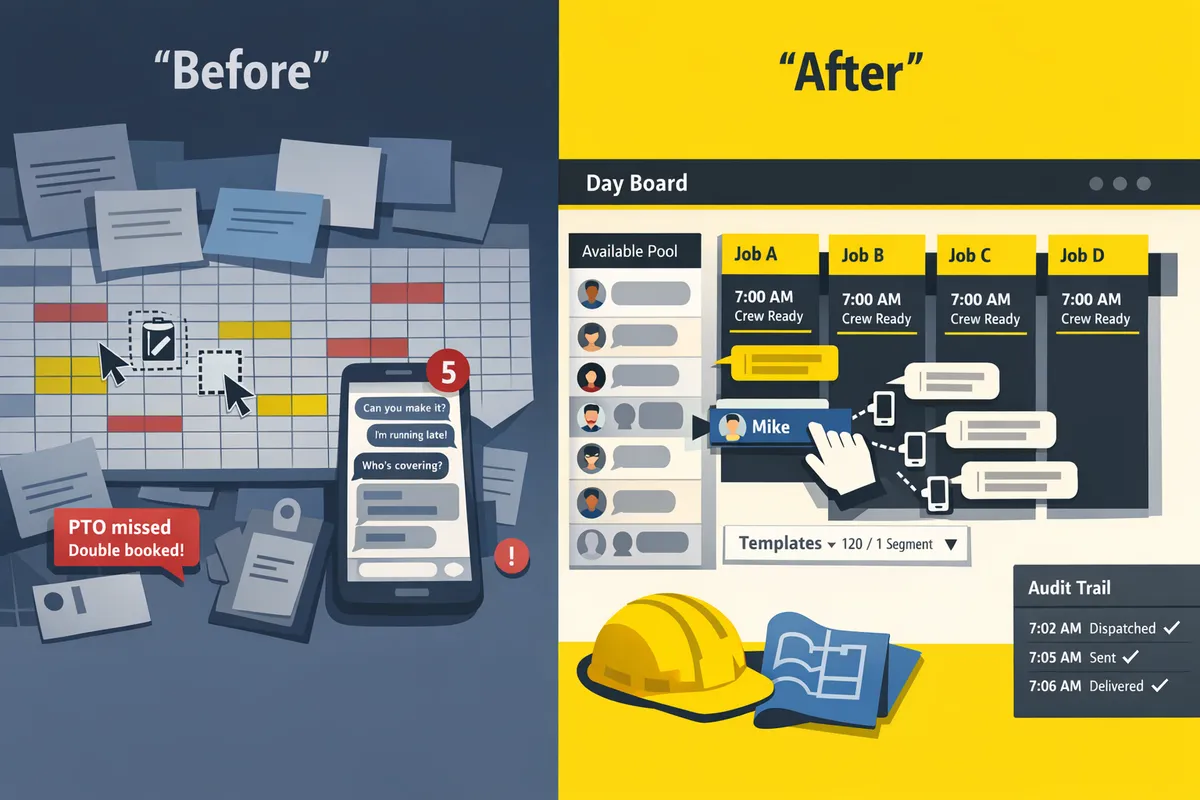
Spreadsheets and copy-paste texts fail as changes scale because templates break, PTO is hidden, and manual edits introduce address or timing errors. A common failure path looks like this:
- Operator copies a row from the day sheet into a template SMS.
- The copied address column shifts, producing the wrong site in the message.
- The scheduled crew was on PTO in a separate calendar, so a double-booked worker shows up late.
- The operator spends an hour on calls, arranges a replacement, and issues corrected texts.
That sequence creates both hard costs (idle crew pay, travel) and soft costs (lost client trust, extra admin time). Spreadsheets also lack delivery audit logs and centralized opt-in records, which raises compliance risk when volume grows.
CrewSheet addresses those failure points by making PTO visible in the crew pool, enforcing single-use assignment per day, and keeping message templates and an audit trail with each send. For operators who want a no-login, push-based workflow, our no-login crew scheduling solution explains how to stop accidental double-bookings and reduce error-prone edits.
How does an SMS-first triage workflow reduce downtime and keep crews aligned?
An SMS-first triage workflow reduces downtime by sending short, one-way job updates that remove login friction and centralize PTO and templates. CrewSheet’s day-board and template-driven sender let an operator build the day, exclude PTO, and notify every worker in seconds. That cuts the back-and-forth that creates standby hours and missed starts.
Core components of an SMS-first triage workflow
A reliable triage workflow requires a day-board view, a PTO-aware available pool, stable message templates, and a one-way SMS sender. Map to operator tasks and CrewSheet features:
- Day-board (schedule build). Operator task: arrange jobs and start times visually, then commit the day. See our CrewSheet day-board for the drag-and-drop board.
- PTO-aware available pool. Operator task: avoid scheduling people on PTO and spot availability at a glance. PTO visibility prevents accidental double-booking.
- Template-driven SMS sender. Operator task: pick a tested template, preview segment count, and send without edits that break scripts. CrewSheet’s text the crew their schedule page shows template controls.
- One-way SMS sender and audit log. Operator task: send outbound only messages, check delivery status, and avoid expecting confirmations from crews. CrewSheet records sends in the audit log so operators can confirm dispatch without requiring field-worker logins.
Roles and quick responsibilities:
- Operator (Scheduler): builds the board, enforces PTO, selects templates, and sends messages.
- Field Lead: reports on-site constraints and approves delay messaging.
- Foreman: receives job roster view and acts on next-step instructions.
- Crew Member: receives concise instructions by SMS and follows the next step.
Link for further best practices on push-only messaging: read One-Way Field Communication for Job-Site Crews.
Message design rules and a short construction delay notification sms template ✉️
Keep messages to one short sentence that states the job, reason, new status or start time, the next action, and standard opt-out language.
Design rules:
- One visible action. Example: "Report to site at X time" or "Hold until further notice."
- Identify the job clearly: job number or short name plus location if ambiguous.
- State the change and next step in plain language. Avoid multi-clause sentences.
- Keep length under 160 characters when possible; CrewSheet shows a live segment counter when composing.
- Include required opt-out language (Reply STOP to opt out) to remain compliant with carrier rules.
Template pattern (use template variables your system supports):
- Pattern: [JOB_ID|JOB_NAME] — [SHORT_REASON]. New start: [TIME/STATUS]. Next: [ACTION]. Reply STOP to opt out.
Concrete example you can reuse:
- Job 412 - Delay: materials late. New start 09:30. Foreman to confirm ETA. Reply STOP to opt out.
💡 Tip: Always use double opt-in for SMS signups.
⚠️ Warning: Avoid sending protected health information or other sensitive personal data over SMS.
For more on templates and safe sends, see the CrewSheet text messages feature.
When to use SMS, email, or voice for delay communication 🔁
Use SMS for immediate day-of updates, email for attachments or long instructions, and voice for safety incidents or when SMS delivery fails.
Decision rule checklist:
- One-line change? Send SMS. Examples: start time shift, short hold, or quick reassignment.
- Requires documents, photos, maps, or long instructions? Use email so recipients get attachments and a searchable thread.
- Safety risk, legal exposure, or confirmed non-delivery? Escalate to voice (call the foreman or operator).
Operational notes using CrewSheet:
- Send day-of updates directly from CrewSheet’s schedule sender for one-line changes. That keeps the operator workflow under 30 seconds and avoids spreadsheet copy-paste errors.
- Use email for weekly plans or attachments generated from your ERP; CrewSheet supports email sends for longer communications.
- If delivery shows as failed in CrewSheet’s audit log, call the crew lead. Do not rely on replies or read receipts from SMS; CrewSheet’s model is intentionally one-way.
For more on channel selection and ROI of an SMS-first approach, see Construction Dispatch Management Software and our comparison in Best SMS Dispatch Software for Construction Crews.
How do you implement day-of delay triage, enforce governance, and measure ROI?
Use a three-part approach: a repeatable operator checklist, carrier-compliant templates with fallbacks, and simple ROI metrics tied to scheduler time and avoided rework. This section gives a concrete rollout checklist you can train operators on in one shift, a short comparison of common setups, and a compact ROI calculator you can use to justify the change.
Five-step operator checklist to triage delays and send SMS quickly 🚦
Follow a five-step operator checklist to triage delays and dispatch crews by SMS quickly and consistently. Train every operator to run the same flow so sends stay fast and audit logs remain complete.
- Open the day-board and scan the job columns for flagged delays or weather notes. Mark any affected job card with a single-day delay tag so the board shows exceptions at a glance.
- Confirm PTO and unavailable crew in the pool for the day. Remove grayed-out names from assignment consideration to avoid accidental scheduling on PTO.
- Assign or reassign crew from the pool to open slots, using bulk-drag for multi-person moves and the single-use rule to avoid double-booking.
- Pick a delay or schedule template from the template dropdown, edit only the variable fields (job number, start time), and confirm the live SMS character counter before send.
- Send the one-way SMS and immediately log the send in the job notes or audit trail. Record manual follow-ups if a voice escalation is required.
💡 Tip: Always use double opt-in for SMS signups to reduce opt-out complaints and carrier issues.
See CrewSheet crew scheduling text messages for template examples and the send flow to train new operators.
How to measure ROI: inputs and a simple calculator 🧮
Measure ROI using scheduler hours saved, avoided call volume, reduced travel minutes, and prevented reassignments. Those four inputs map directly to weekly labor savings and can be translated into a payback period.
Calculator inputs (enter your company numbers):
- Scheduler hourly rate (dollars per hour).
- Average scheduler minutes saved per delay by using SMS instead of phone calls.
- Average number of delay incidents handled per week.
- Average travel minutes avoided per incident (if clearer messaging prevents dispatching extra crews).
- Average cost of a prevented rework or overtime reassign (optional).
- Monthly tool cost (if evaluating CrewSheet or another paid solution).
Simple weekly-savings formula:
- Scheduler savings = (minutes saved per incident / 60) * hourly rate * incidents per week.
- Travel savings = (minutes avoided per incident / 60) * travel cost equivalent * incidents per week.
- Rework avoidance = estimated dollars avoided per prevented reassign * number of prevented reassigns per week.
- Total weekly savings = sum of the three values above.
- Payback (weeks) = (monthly tool cost) / (total weekly savings * 4.33).
Illustrative example (hypothetical): assume a scheduler saves 30 minutes per delay, handles 10 delay events per week, and the total weekly savings equals $600. If your monthly tool cost is $900, the payback would be about 3.5 weeks. This is an example to show the math; plug in your rates and incident counts for an accurate result.
For broader context on time savings from SMS-first dispatch, see our Construction Dispatch Management Software article that compares morning send workflows and time-per-send benchmarks.
Compliance, delivery reliability, and offline backup plans 🔒
Enforce governance by recording opt-ins, including clear opt-out language, and registering campaigns under A2P 10DLC for carrier approval. These steps reduce carrier-level rejections and protect your company from fines and deliverability issues.
Practical compliance checklist:
- Maintain a signed or timestamped opt-in record for every phone number in your distribution list.
- Use a standard opt-out line in every message and document the opt-out process in your SOPs.
- Register your brand and campaign with A2P 10DLC; keep registration records and campaign IDs in an accessible folder.
- Audit message templates quarterly to remove personal health information or other sensitive data.
Delivery reliability and fallback options:
- Automatic retries: configure the SMS provider to retry transient failures and surface persistent failures to the operator.
- Email fallback: if delivery status shows failure after retries, automatically send the same job info by email to the recipient and the foreman.
- Manual voice escalation list: maintain a short list of phone numbers to call for high-impact or time-critical failures.
⚠️ Warning: Keep SMS content free of sensitive personal health information and record consent for every recipient.
For guidance on one-way messaging best practices and send windows, see One-Way Field Communication for Job-Site Crews.
Quick comparison table 🧾
Use this table to compare spreadsheets plus group texts, Assignar, and CrewSheet across setup time, PTO visibility, login requirements, templating safety, and fit for small trades.
| Capability | Spreadsheets + Group Texts | Assignar | CrewSheet |
|---|---|---|---|
| Setup time | Low initial setup, high ongoing edits | High setup, long deployment | Low setup, fast daily use |
| PTO visibility | Often separate, easy to miss | Built-in but rigid | PTO visible in pool for the day |
| Field-worker login | No. | Yes, required | No logins — one-way SMS |
| Templates & safe edits | Fragile, copy-paste risk | Structured but rigid | Template dropdowns with live counters |
| Fit for small trades | Common but fragile | Enterprise buyers | Designed for small-to-midsize trades |
Frequently Asked Questions
This FAQ provides short, practical answers to common questions about texting crews, compliance, and moving from spreadsheets to CrewSheet. Each answer names the immediate action an operator should take and the CrewSheet capability that handles it.
How do I text my crew about a weather delay? ⛈️
Send one concise SMS that names the job, states the delay reason, and lists the next step or expected time. For example: “Job 342 — 123 Main St. Delayed due to heavy rain. New plan: standby, ETA 9am tomorrow. Watch for update.” Log every send in the audit trail so operators can prove who received the notice and who sent it. CrewSheet stores that audit entry automatically when you send from the day board and saves the exact message text and timestamp for later review.
💡 Tip: Use a single template for day-of delays so operators copy less and make fewer mistakes.
Can I send schedule texts without making workers create accounts? 📲
Yes. One-way SMS pushes let operators notify workers without requiring field logins or app installs. CrewSheet uses phone-based distribution lists and sends outbound-only messages so field crew never need credentials and operators avoid onboarding friction. This model reduces morning admin compared with spreadsheet-plus-group-text workflows and aligns with our one-way communication guidance in One-Way Field Communication for Job-Site Crews.
How do I avoid double-booking crew members across sites? 🔁
Use a single-day board with single-use enforcement and visible PTO so operators cannot assign the same person to more than one job that day. CrewSheet shows PTO in the pool and blocks same-day double assignments; operators should also run two quick checks before sending: confirm the job card shows assigned crew count and scan the pool for any grayed-out PTO entries. If you still rely on spreadsheets, see the comparison in Construction Dispatch Management Software to understand how the day-board removes common manual errors.
What should a weather delay text to a construction crew include? ⏱️
A weather delay SMS should include job name/number, current status (delayed or cancelled), an immediate next step or estimated restart time, and opt-out instructions if required. Keep the message to a single short SMS for readability; long multipart texts increase confusion and can trigger extra carrier segments. CrewSheet message templates let you preview length and pick a compact phrasing so operators do not over-edit at send time.
Is SMS compliant for construction notifications and what do I need to track? ⚖️
SMS can be compliant when you capture opt-in consent, include required opt-out language, and register campaigns with carrier-approved A2P (10DLC) settings. Keep a minimal compliance record for each recipient: the phone number, opt-in timestamp or source, the template used at send time, and any opt-out events; CrewSheet logs sends and opt-out events in the communications history for audits. Do not assume conversational replies count as consent; maintain written opt-in records tied to the employee or hire paperwork.
⚠️ Warning: Failure to record opt-in or to use carrier-approved A2P settings increases the risk of message blocking or regulatory complaints.
How do I import jobs and crew from a spreadsheet into an SMS dispatch workflow? 📁
Import jobs and crew via CSV with clearly mapped columns: job number, job name, address, start date, crew name, and phone. Map columns once, run a small sample day import, and then verify sends to a handful of crew before full rollout; this prevents a mass mis-send caused by a swapped phone/address column. CrewSheet accepts CSV import and auto-detects common columns; see the CrewSheet getting-started guide for recommended column names and a step-by-step CSV import checklist.
What operational savings can I expect from switching away from spreadsheets? 💸
Savings come from fewer correction calls, reduced reassignments, and faster sends that cut scheduler time each morning. Estimate savings by multiplying avoided calls per day and reassignment minutes by your scheduler labor rate; for example, cutting two 10-minute callback cycles per day saves 20 minutes daily per operator. Run a two-week before-and-after trial: measure total scheduler minutes spent on calls and edits, then compare to time spent building the board and sending with CrewSheet to calculate payback and annualized savings.
Next steps to triage delays and dispatch crews
Prioritize the worst-hit sites, assign the closest available crews, and send one clear SMS per crew to stop confusion immediately. This playbook shows how a short triage routine reduces idle time and prevents double-booking when you need field crew dispatch via sms across multiple sites. For multi-site delays, focus on three actions: flag the delay, reassign nearby resources, and notify affected crews with a single, authoritative message. This approach minimizes lost billable hours and keeps foremen informed without extra sign-ins or apps.
💡 Tip: Use a simple construction delay notification sms template that states the delay reason, the revised start or standby instruction, and a single point of contact. Keep each message under one SMS segment where possible.
Move from process to action: download the Delay Triage Checklist and the Crew Sheet getting-started guide to try the workflow in your morning routine. For implementation best practices, see our one-way field communication guide and the best SMS dispatch software comparison to pick the right template and timing for your crews.