Best SMS Dispatch Software for Construction Crews

Best SMS Dispatch Software for Construction Crews
A single mis-sent schedule text can leave a 10-person crew waiting and cost hundreds in idle labor. The best SMS dispatch software for construction crews is SMS-first dispatch tools that send day-of job details by text, reduce manual copy-paste from spreadsheets, and provide delivery audit logs. Our comparison evaluates SMS-first dispatch tools, features, and ROI, and recommends best-fit options for small-to-midsize trades operators. We spotlight CrewSheet and compare its drag-and-drop day board, PTO-aware pool, and no-login, one-way SMS workflow (see sending schedules with CrewSheet). We measure time saved per send, template safety, compliance (10DLC A2P), and hidden costs such as forced logins or lengthy onboarding. Compare price, setup time, and real-world ROI to see which tool stops missed crews without adding admin overhead.
1. How We Picked the Best SMS Dispatch Software for Construction Crews
We scored vendors on the features that directly reduce morning chaos: SMS delivery, day-board scheduling UX, PTO awareness, no-login delivery, communications auditability, and total cost of ownership. The ranking reflects hands-on tests designed to measure the three buyer problems operators care about most: speed, fewer schedule mistakes, and carrier compliance.
Scoring criteria and weights 🧾
Scoring criteria weighted SMS delivery features, scheduling speed, PTO handling, no-login workflows, communications audit logs, and total cost of ownership most highly. We assigned heavier weights to items that cut daily admin time or prevented costly mistakes. For example, PTO handling is scored not just for presence but for visibility on the day board and whether PTO entries block or gray out a crew member during assignment. SMS delivery features is a category that includes message templates, segment counters, delivery reporting, and carrier compliance; we measured whether templates are editable without breaking scripts and whether the UI shows true SMS segment counts.
What we measured and why it matters:
- SMS delivery features. Measured template safety (editable templates with counters), send channels, and delivery status visibility. Clear templates and segment counters prevent broken messages and surprise messaging costs.
- Day-board scheduling UX. Measured drag-and-drop speed, bulk assignment, and single-use enforcement. Faster assignment reduces morning prep time; single-use prevents double-booking.
- PTO handling. Measured PTO visibility in the pool and enforcement at assignment. PTO-aware tools cut scheduling mistakes that cause idle crews or last-minute reassignments.
- No-login workflows. Defined as a capability that sends schedule details as outbound SMS or email so field workers do not need app logins. We scored tools that push messages to phone numbers without requiring field accounts higher, since many trades crews refuse extra logins.
- Auditability and delivery logs. Measured timestamped records and recipient delivery status. Audit logs cut disputes over who was notified and when.
- Total cost of ownership. Measured subscription structure, per-message fees, and expected admin hours saved. We translated admin-hour savings into a simple weekly-cost comparison for a 10–20 person crew.
CrewSheet is scored highly where day-board speed, no-login sends, and template safety reduce morning rework; see CrewSheet features for the capability list and message-flow details.
Evaluation process and hands-on tests 🧪
We validated vendors by running a full import-to-send scenario for realistic shop sizes. In each test we imported CSV job and crew lists, built a day board, assigned crews, and sent SMS templates to validate the schedule→notify loop end to end. We recorded time-to-complete, template editing safety, and whether delivery status and audit logs matched the UI claims.
Concrete checks we ran:
- CSV import fidelity. Did job numbers, addresses, start times, and ideal crew sizes map automatically or require manual fixes? Poor mapping adds 15–45 minutes to setup.
- Board build speed. Timed setting up 10–20 jobs with a 15–40 person pool. We measured how long bulk-assign and drag-to-assign saved versus manual row edits.
- Send workflow safety. Tested selecting a template, editing it, viewing real SMS segment counts, and sending per-job versus bulk sends. We flagged tools that hide segment counts or lock templates.
- Audit and delivery visibility. Confirmed timestamps, recipient lists, and delivery status. We audited logs to ensure an operator can prove who received a schedule.
CrewSheet’s day-board and one-way SMS model simplified the tests: templates are editable with a live segment counter and the audit log records each send. That made it obvious which vendors reduced proofing time and which still felt like spreadsheet+group-text under different branding.
⚠️ Warning: Verify A2P 10DLC registration and carrier compliance before any large-volume sends. Carrier approval delays can stall a deployment and increase delivery failures.
Buyer personas and use cases covered 👷
This guide targets the Operator/Scheduler, foremen, and field crew at small-to-midsize trades firms such as coatings, HVAC, and specialty trades. The Operator/Scheduler needs a fast day-board and safe templates; foremen need a filtered “who’s on my job” view; crew members need clear SMS instructions without any app or login.
Use cases we prioritized:
- Daily dispatch by SMS (per-job and bulk sends). Operators build a board and notify the whole crew the same way they would with a group text but without copy-paste risk.
- PTO-aware assignment to avoid accidental scheduling on time off. We scored tools on whether PTO appears directly in the available pool for the selected date.
- One-way announcements for last-minute changes. We tested segmented broadcasts by division or job roster.
CrewSheet maps to these personas with a drag-and-drop day board, PTO-aware pool, and push-based SMS so field workers remain login-free. For operators wanting a broader comparison of scheduling approaches, see our piece on crew scheduling software for construction trades and our article on construction dispatch software for context.
Out-of-scope scenarios 🚫
We excluded enterprise GC workflows and heavy ERP-driven automation from this roundup. If your process requires per-worker logins, complex approval gates, automated timekeeping integration, or deep ERP job-syncing, this guide will not evaluate those capabilities. Those features belong to full construction-management suites and create different vendor trade-offs (longer onboarding, per-seat licensing, and enforced role rigidity).
Why we excluded them: tools focused on ERP and workforce logins trade speed and simplicity for control. Small-to-midsize trades operators we spoke with repeatedly preferred a fast, no-login dispatch loop to avoid long implementations and daily proofing overhead. If you need enterprise-grade integrations or per-worker time-tracking, consult a dispatch management comparison like our construction dispatch management software review or consider vendor platforms that integrate directly with ERP systems.
2. Which SMS Dispatch Tools Rank Best for Construction Crews?
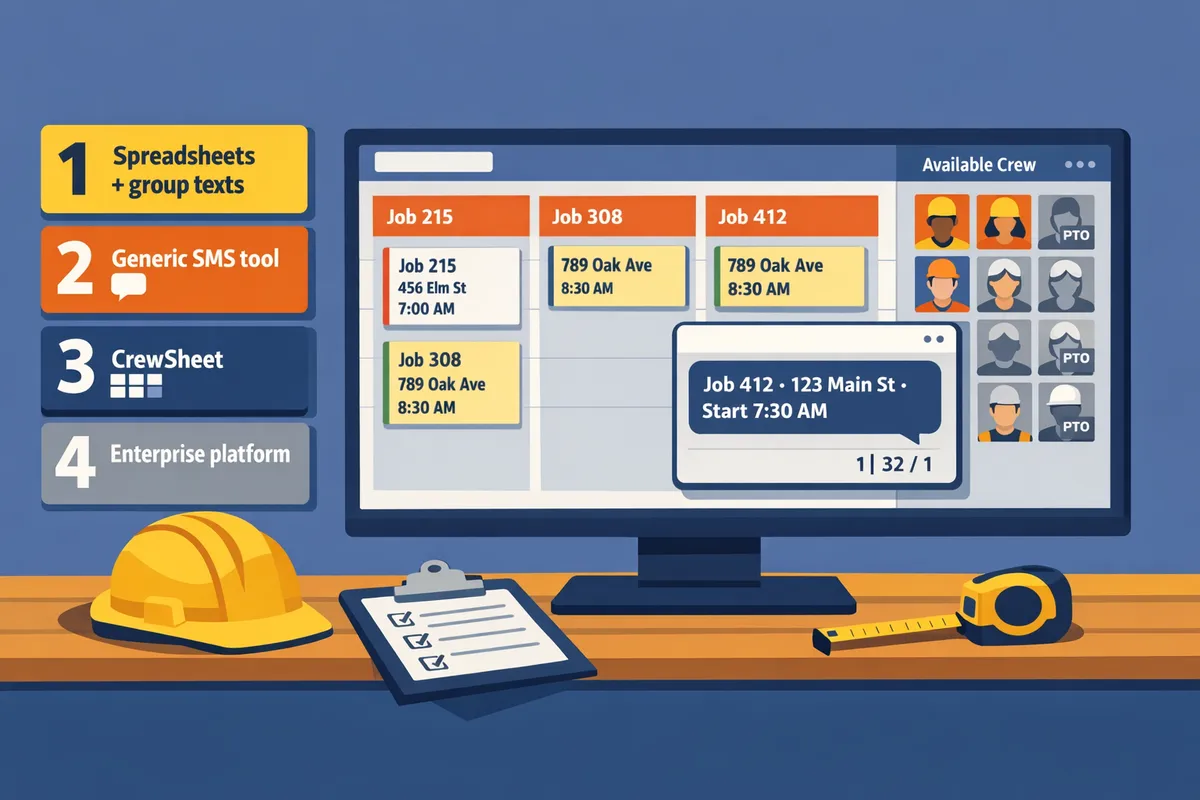
Choosing the right SMS dispatch approach comes down to a trade-off between simplicity, messaging reliability, and how much scheduling control you need. Below we compare four common paths—CrewSheet, Assignar, a spreadsheet plus an SMS provider, and specialist messaging vendors—and show which contractors each fits best.
CrewSheet — SMS-First Day-Board for Trades 🚧
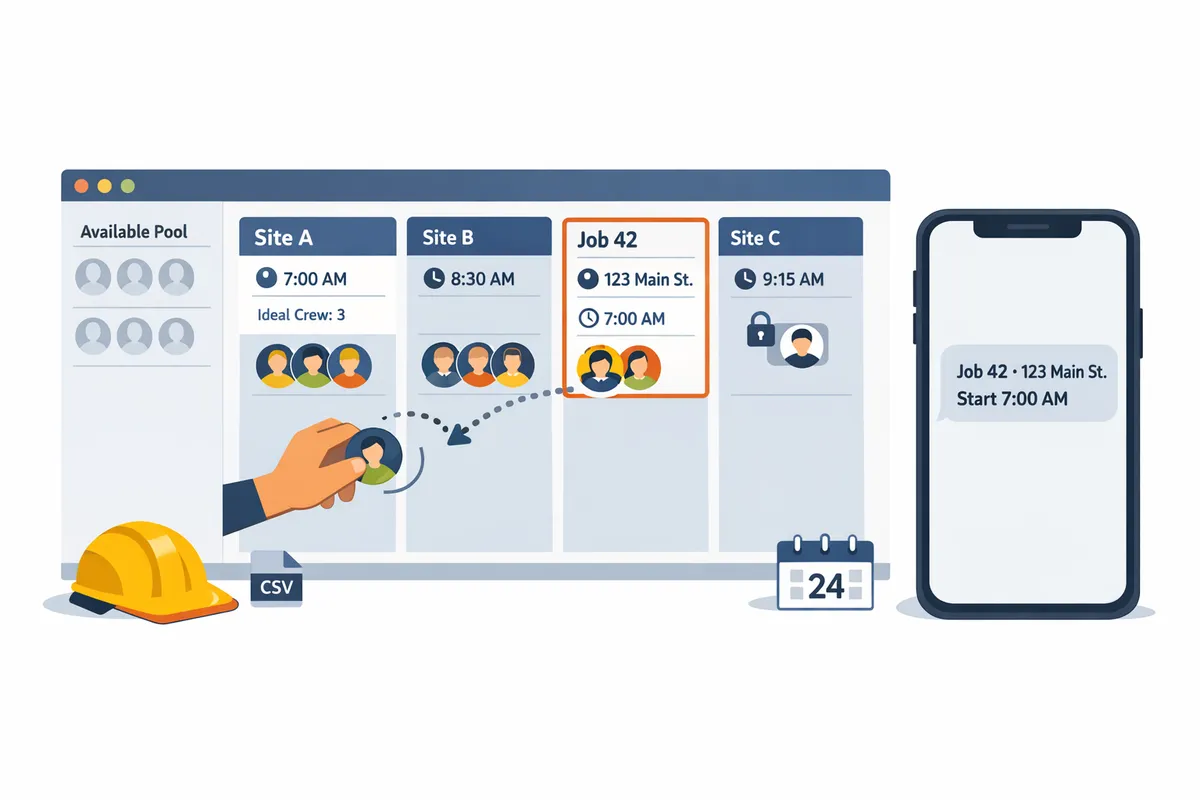
CrewSheet is purpose-built crew-scheduling software that sends daily job assignments by SMS without requiring field-worker logins. The day-board centers on one-day job cards, drag-and-drop assignment, PTO-aware availability, single-use enforcement, and pre-formed SMS templates with a live character/segment counter. The operator builds the board and sends job texts without creating accounts for crew members; see details on Sending the schedule for how bulk sends and per-job templates work.
Ideal customer. Small-to-midsize specialty-trade operators (coatings, HVAC, small remodel crews) currently using Google Sheets plus group texts and who need a fast schedule-to-notify loop.
Pros.
- No field-worker logins; push-based SMS reduces onboarding friction.
- Day-board UX keeps scheduling focused on start times and crew rosters.
- PTO-aware pool prevents accidental scheduling on days off.
- Message templates with live counters reduce multi-segment surprises.
Cons.
- Not an ERP replacement; no built-in time-and-attendance enforcement.
- Communication is intentionally one-way; crew do not confirm via text.
How CrewSheet fits. CrewSheet replaces fragile spreadsheets and group texts while keeping flexibility for operators who need quick changes and minimal admin. For a primer on choosing this category, see Construction Dispatch Management Software.
💡 Tip: Use message templates with the live SMS counter to avoid running into multi-segment billing and to keep messages concise for field clarity.
Assignar — Full Construction Platform (When You Need ERP-Grade Controls) 🏗️
Assignar is a full construction workforce and compliance platform built for larger contractors that require per-user logins, certification tracking, and strict role enforcement. Assignar adds audit trails, time-tracking, and compliance modules that larger general contractors and enterprise teams need for regulatory and payroll accuracy.
Ideal customer. Enterprise GCs and large contractors that must document certifications, manage payroll integrations, and enforce per-user permissions across many projects.
Pros.
- Deep compliance and certification tracking.
- Strong auditability and role-based controls.
- Integrations into broader ERP workflows for larger organizations.
Cons.
- Implementation can take weeks and requires admin time.
- For small trades, per-field-user logins create friction and reduce adoption.
- Rigid crew-size rules can block practical overstaffing workflows common in trades.
How CrewSheet fits. Operators who find Assignar too heavy often move to CrewSheet to regain speed and avoid forcing every worker to create an account. See our comparison of Scheduling Software for Construction Crews to weigh the trade-offs between speed and enterprise controls.
Google Sheets + SMS Provider — Low Cost, High Manual Overhead 🧾
A spreadsheet plus an SMS sender remains the cheapest path but keeps high manual risk for copy-paste errors, template drift, and PTO conflicts. This approach gives maximum flexibility at minimal cash outlay, but operational costs rise in wasted hours and increased error rates as crew counts grow.
Ideal customer. Very small shops or startups with 1–10 crew members that accept manual admin to avoid monthly software fees.
Pros.
- Lowest upfront cost and full control over templates and format.
- Easy to prototype ad hoc schedules and one-off messages.
Cons.
- No single audit trail; message history scatters between apps.
- High risk of double-booking crew or texting someone on PTO.
- Carrier compliance and A2P 10DLC registration often falls on you unless the SMS vendor handles it.
⚠️ Warning: Carrier compliance (A2P 10DLC) and campaign registration may be your responsibility with a DIY setup. Confirm whether your SMS vendor manages brand registration to avoid deliverability issues.
How CrewSheet fits. CrewSheet targets operators who want spreadsheet flexibility without the manual hazards. If your team spends 30–60 minutes each morning copy-pasting into group texts, moving to a day-board plus push-based SMS reduces that hourly waste; learn more in our Construction Dispatch Software guide.
Specialist SMS Vendors — Messaging Power with Fewer Scheduling Features ✉️
Specialist SMS vendors are messaging platforms that focus on deliverability, segmentation, two-way messaging, and A2P 10DLC compliance, but they typically lack a trades-focused day-board and PTO-aware scheduling. Use them when messaging scale, compliance, or campaign segmentation matters more than crew assignment UX.
Ideal customer. Companies that already have a scheduler or ERP and only need a reliable messaging layer for alerts, two-way confirmations, or segmented campaigns.
Pros.
- Strong deliverability and carrier compliance support.
- Advanced message segmentation and analytics.
- Two-way flows and webhook integrations for automated responses.
Cons.
- No built-in day-board or crew single-use rules.
- Requires pairing with a scheduler or spreadsheet to manage daily assignments.
How CrewSheet fits. Pairing a specialist SMS vendor with CrewSheet is unnecessary for basic day-to-day crew dispatch since CrewSheet includes built-in SMS delivery and 10DLC handling. For operators who already run ERP-driven workflows, a specialist SMS vendor can serve as the messaging backbone while CrewSheet or a scheduler handles assignments.
Feature comparison table
The table below maps core SMS and scheduling trade-offs across the four approaches so you can match features to priorities.
| Option | SMS features | One-way vs two-way | PTO support | No-login delivery | Scheduling UX | Typical pricing model |
|---|---|---|---|---|---|---|
| CrewSheet | Built-in SMS templates, live segment counter, 10DLC handling | Primarily one-way outbound | Visible PTO in pool (prevents scheduling) | Yes - push SMS to phone numbers | Day-board (drag-and-drop) | Flat monthly plan (operator-focused) |
| Assignar | SMS + in-platform notifications, deep audit logs | Supports two-way where needed | PTO via role/calendar modules | No - per-user logins typical | Calendar + role-based scheduling | Per-user / enterprise pricing |
| Google Sheets + SMS provider | Any SMS provider; manual templates | Depends on vendor (usually two-way possible) | Manual (separate sheet) | Yes if sending to phone numbers, but no built-in safety | Spreadsheet rows / ad-hoc lists | Free to low-cost tools plus per-message fees |
| Specialist SMS vendors | Advanced segmentation, deliverability, analytics, A2P support | Two-way native, webhooks | Not included (must integrate) | Yes for messaging, no scheduling controls | None - messaging only | Per-message or tiered plans |
When to pick each option
Choose CrewSheet when you need a fast SMS-first day-board with visible PTO and no field-worker logins. CrewSheet is designed for operators who want to build a day's schedule and notify crew without onboarding every worker.
- Pick CrewSheet if your operator spends significant time each morning copying schedules into group texts and you need a no-login, PTO-aware day-board.
- Pick Assignar if your organization requires enterprise audit trails, certification tracking, and strict role enforcement for compliance and payroll.
- Pick Google Sheets + an SMS provider only if budget is the primary constraint and you accept manual risk and added admin time.
- Pick a specialist SMS vendor when you already have a scheduler or ERP and need advanced deliverability, or two-way workflows.
For readers unsure where to start, our CrewSheet features page shows the day-board workflow and how sending schedules works, and our Crew Scheduling Software for Construction Trades article lays out the operational differences between spreadsheet workflows and SMS-first dispatch.
3. How to Choose the Right SMS Dispatch Tool for Your Crew
Pick a tool that matches your crew size, schedule complexity, and how much admin time you can tolerate. The right product reduces daily scheduling friction, prevents PTO mistakes, and centralizes the send audit trail. CrewSheet targets operators who want a day-board workflow with push SMS so you can build and notify the crew without forcing field logins.
Decision Checklist ✅
Prioritize no-login SMS, PTO-aware scheduling, editable templates with a live SMS counter, and an audit log that records sends and delivery status. No-login SMS is a communication model that pushes schedules to phone numbers without requiring field workers to create accounts. During a demo or trial, run these concrete tests:
- No-login SMS test: add a crew phone number and send a schedule to one worker to confirm they receive text with job, address, and start time. CrewSheet shows how a push-only model works in practice.
- PTO awareness test: mark a crew member on PTO and try to assign them to a job; the system should flag or gray them out. CrewSheet’s PTO-aware pool prevents scheduling mistakes.
- Template and SMS counter test: open the message composer, pick or edit a template, and confirm the live SMS character/segment counter updates.
- Audit log test: send a batch and then review the communication history to see timestamps, recipient lists, and delivery status.
Run each test on your trial data rather than vendor demo accounts. That exposes common data-cleaning problems like bad phone numbers or mismatched PTO records.
ROI Scenarios and What To Measure 💰
Calculate ROI by measuring admin hours spent assembling schedules, frequency of mis-schedules or PTO conflicts, and current SMS/phone costs. Collect these inputs before a pilot: weekly scheduler hours spent preparing sends, number of scheduling errors per month, average hourly cost for the scheduler, and annual spend on SMS or bulk texting tools.
Use a simple formula: (Hours saved per week × scheduler hourly rate × 52) + reduced penalty/overtime costs − annual subscription and onboarding. For example, a scheduler who spends 8 hours/week compiling messages and saves 5 hours/week at $25/hour would free about $6,500/year in labor. Treat any examples like illustrations, not proof; run the math with your actual numbers. CrewSheet’s flat pricing and unlimited SMS simplifies the subscription line in that comparison.
Track three outcome metrics during a pilot: admin time saved (minutes per send), number of PTO-related schedule conflicts avoided, and delivery failure rate. Export those figures into a one-page ROI summary for stakeholders.
Deployment Timeline and Common Onboarding Pitfalls 🛠️
Most operators can import jobs and crew via CSV, create templates, and send live schedules within one to three days. The fastest setups use clean CSV exports from your accounting or job system and a single operator focused on building the day board. CrewSheet supports CSV import for both jobs and crew to speed this step.
⚠️ Warning: Sending mass texts without A2P 10DLC registration raises carrier filtering and deliverability risk. Confirm the vendor handles this before you start a pilot.
Why DIY Spreadsheets and Group Texts Cost More Than They Seem
Spreadsheets plus group texts create hidden costs from admin time, scheduling errors, and carrier compliance risk. Copy-pasting rows into group messages consumes scheduler hours and invites template breakage. For example, a single missed PTO cell in a sheet can lead to a double-booked crew and an emergency overtime call that costs far more than the monthly price of a dedicated tool.
Other costs include lack of an audit trail for who received which message, difficulty proving delivery when disputes arise, and carrier-level filtering for unregistered mass SMS. CrewSheet replaces those manual steps with a single-day board, pre-formed templates, and a communication history so you stop chasing who got what. Read our deeper comparison in Construction Dispatch Management Software to see why an SMS-first tool often pays back quickly versus manual workflows.
Recommended Next Steps (For a Busy Operator) ▶️
Run a focused two-day pilot to validate time savings and delivery. Follow this step-by-step checklist:
- Export one week of jobs and your crew roster to CSV and import into the trial account. CrewSheet’s CSV import will auto-detect name, phone, and role columns.
- Create two message templates: a standard schedule and a last-minute update. Confirm the live SMS counter so you know segment costs.
- Send schedules for three days to a small subset (3–6 crew) and track admin time for each send.
- Log any delivery failures, PTO conflicts prevented, and scheduler minutes saved.
- Share the pilot metrics with the office and one foreman to validate real-world usefulness.
- Decide whether to expand to full crew based on admin time saved and delivery reliability.
💡 Tip: Time the scheduler during the pilot. Measure minutes to assemble the board, proof messages, and send. That one metric often makes the purchase decision obvious.
Frequently Asked Questions
This FAQ answers common buyer questions about templates, no-login dispatch, A2P 10DLC compliance, preventing double-bookings, and migration timelines. Each short answer names the practical steps and product features operators use to send reliable, audit-ready schedule texts.
How do I text my crew their schedule every morning? 📲
Use an SMS-first scheduling tool that supports bulk schedule sends and reusable templates instead of manual group texts. Build the day board, import jobs from a CSV, pick a pre-formed message template, and send the day’s jobs in one action to remove copy-paste errors. For example, set up job templates that include job number, address, and start time, then map CSV columns once so future imports require no rework. CrewSheet supports drag-and-drop assignment, message templates with a live SMS character counter, and a bulk "send schedule" action so an operator can assign and notify all crew without opening a separate messaging app. See our guide on sending the schedule for step-by-step examples.
Can I send schedules without making crew create logins? 🤔
Yes. A push-based model sends SMS and email to phone numbers so field crew do not need accounts or an app. That approach removes friction for field workers and keeps the workflow with the Operator or Scheduler. CrewSheet uses a no-login, one-way communication model so foremen and crew receive job details by text without creating credentials. If you want a deeper explanation of the trade-offs between no-login push and full-platform deployments, read our Crew Scheduling Software for Construction Trades overview.
What is A2P 10DLC and do contractors need it? 📡
A2P 10DLC is the carrier registration system for U.S. business SMS, and contractors sending regular bulk schedule messages should use an SMS provider that handles 10DLC registration. Registered campaigns face fewer filtering issues and better deliverability than unregistered bulk sends. Without 10DLC you risk higher filtering rates and intermittent carrier blocks when you send many schedule messages in a short window. CrewSheet includes built-in 10DLC handling through our SMS delivery partner so you do not need to manage carrier registration yourself.
💡 Tip: Always use double opt-in when collecting crew phone numbers so your 10DLC registration and deliverability stay clean.
How do I avoid double-booking crew members? 🚫
Prevent double-booking by using a scheduler that enforces single-use assignments, displays PTO in the available pool, and runs clash checks when you assign. With single-use enforcement, the system blocks assigning the same person to two jobs for the same date; visible PTO prevents scheduling someone on a day off. In practice, operators use the day-board to drag workers from the pool to jobs and instantly see blocked assignments or grayed-out PTO entries. CrewSheet implements single-use enforcement and a PTO-aware pool so you catch clashes before you send texts.
Is Assignar better for small trades than an SMS-first tool? ⚖️
Assignar provides enterprise features that work for large contractors, but for small-to-midsize trades an SMS-first tool usually saves time and reduces admin overhead. Assignar often requires field-worker logins, enforces rigid crew-size rules, and needs more setup and governance. An SMS-first product like CrewSheet keeps flexibility, avoids forcing every worker to create credentials, and focuses on fast day-of sends—trade-offs that matter when you run multiple small jobs per day. If you need full ERP integrations, payroll hooks, or heavy compliance modules, Assignar may fit; if your priority is quick, reliable crew dispatch by text, consider an SMS-first approach and read our comparison in Construction Dispatch Management Software.
How long does it take to move from spreadsheets to an SMS dispatch tool? ⏱️
A typical migration takes about one to three days if you clean CSVs, import jobs and crew, create two message templates, and perform a trial send. The usual steps are: 1) export and standardize crew and job CSVs, 2) import into the scheduler and confirm column mapping, 3) build and test message templates, and 4) run a live send to a small group before full roll-out. Most delays come from bad contact data (missing or malformed phone numbers) and waiting for carrier registration to finalize for large-volume sends. CrewSheet's CSV import with smart column auto-detection and pre-formed templates reduces the manual cleanup time; see our Construction Dispatch Software article for migration checklists and typical timelines.
Choose a dispatch tool that prevents double-booking and texts every worker their start time.
The core takeaway is practical: pick an SMS-first system that replaces fragile spreadsheets and group texts with a PTO-aware day board and one-way sends. The best SMS dispatch software for construction crews removes routine morning busywork, cuts scheduling errors, and returns billable hours to the field. Tools that focus on fast, no-login delivery typically show the quickest ROI for small-to-mid trades.
For a specific next step, schedule a consultation with CrewSheet so an operator can walk through your current board and see a tailored plan. Compare options and trade-offs in our Construction Dispatch Management Software guide to confirm whether a no-login, one-way SMS model fits your crews. Book a short consultation and get an operator-focused demo that shows how to stop double-booking and start sending schedules in under a minute.
💡 Tip: Prioritize PTO-aware scheduling during your consultation to prevent costly last-minute reschedules and overtime.