Day Board vs Time Grid in Field Scheduling

Day Board vs Time Grid in Field Scheduling
A single wrong start time can leave a crew idle for two paid hours and wreck the day's productivity. Day board vs time grid in field scheduling is a comparison that contrasts a start-time-focused day board (jobs shown side-by-side) with an hour-by-hour time grid (calendar-style slots). This article helps schedulers decide which view fits start-time-based, full-day job operations and which trade-offs matter for foremen, operators, and office schedulers. Our CrewSheet uses a drag-and-drop day board and one-way SMS so operators can build a day and send start times in about 30 seconds. Which view actually saves you time on the jobsite?
Which view fits your operation best: day board or time grid?
Choose the view that matches how your crews work, not the one with the most features. For start-time-based, full-day construction jobs, a day board reduces setup time and the risk of double-booking; when tasks vary by hour or overlap across trades, a time grid gives the minute-level visibility you need. Below are clear definitions, decision criteria, and field-proven scenarios to help you pick.
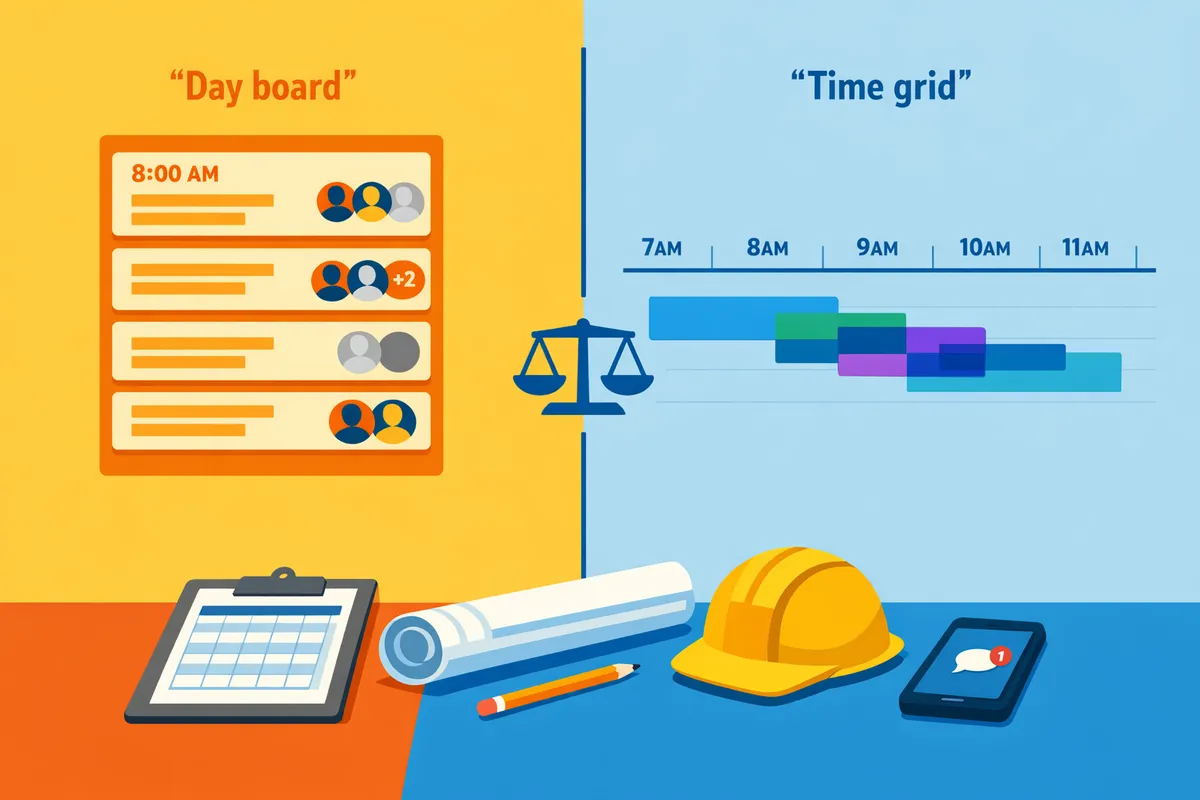
Day board 🗂️
Day board is a visual scheduling view that lists jobs as cards with a single start time and a pooled crew sidebar. Day boards work when job duration is usually the whole day and only the start time matters. CrewSheet's day board supports drag-and-drop assignment from a PTO-aware pool, enforces single-use so a worker cannot be double-booked for the same date, and shows an ideal crew size while allowing overstaffing. Use it when your workflow looks like: 2–4 full-day site assignments per crew, predictable travel windows, and the need to send start-time SMS quickly. For a how-to, see our documentation on the day board and the schedule board.
💡 Tip: Mark PTO in the available pool before building the board so unavailable crew appear grayed-out and cannot be assigned.
Time grid 🕒
Time grid is a calendar-style view that maps jobs across hourly slots and highlights overlaps and resource conflicts. Time grids work when you need to track durations, shift handoffs, and tight sequencing within a single day. Use a time grid if you schedule multiple short tasks per technician, coordinate trades that overlap on the same site, or manage rolling shift handoffs that require precise start/end windows. The layout exposes travel gaps, overlapping resource demands, and opportunities to combine short jobs into efficient runs. If you already use week or timeline views for staffing, link them back to your day-level plan to avoid duplication of effort.
⚠️ Warning: Trying to run minute-by-minute handoffs on a card-style day board often creates hidden conflicts; switch to a time grid before your schedule grows beyond simple start times.
When to prefer a day board vs a time grid ✅
Choose a day board when start time is the primary constraint and crews operate on full-day sites; choose a time grid when durations vary and you must coordinate hourly overlaps. Use this quick decision framework:
- Crew job count per day. If most crews take 1–4 full-day jobs, prefer a day board. If individual techs perform 5+ short tasks daily, prefer a time grid.
- Handoffs and overlaps. If multiple trades must be sequenced on the same site within hours, use a time grid.
- Geography and travel. Long travel windows between jobs favor day boards with fixed start times. Dense, campus-style routing favors time grids.
- Communication cadence. If you must send a single start-time SMS to a crew, a day board simplifies messages and reduces template errors. If you need repeated-in-day updates, the time grid surfaces conflicts before sending.
Use the decision framework with real metrics from your operation: track morning schedule build time, on-time starts, and instances of double-booking for a 30-day sample to measure which view yields measurable ROI. For guidance on mapping project milestones into daily assignments, consult L1 L2 L3 Schedules in Construction.
Example field scenarios that favor each view 🧰
Small-to-midsize coatings crews doing two-to-four full-day jobs per crew favor a day board for speed and fewer mistakes. Example: an operator builds the day board, drags crew from the available pool to jobs, and sends each crew a one-line SMS with the start time and address. That workflow cuts time spent editing fragile group-text templates and prevents scheduling someone on PTO. See our comparison with spreadsheet workflows in CrewSheet vs Spreadsheet-Based Scheduling.
A facilities team scheduling multi-trade, overlapping shifts across a campus benefits from a time grid for coordination and conflict detection. Example: a facilities planner lays out hourly blocks for electrical, HVAC, and contractors, spots a two-hour overlap that will block access, and adjusts handoffs before assignments go to crews. That avoids on-site waiting, reduces rework, and improves on-time completion metrics.
For many mid-sized trades operations, a hybrid approach works best: build the day quickly on a day board for straightforward assignments and switch to a time grid when a job requires sub-day sequencing. CrewSheet supports both approaches so you can keep the day-level simplicity operators want while escalating to hour-level planning when needed. For a product overview of scheduling capabilities, see CrewSheet features.
How do day board and time grid compare on the features and ROI teams care about?
Day boards tend to save schedulers time and reduce start-time errors for full-day, start-time-based jobs, while time grids give better control when jobs overlap or require precise duration tracking. This matters because mistakes on the day translate directly to paid idle hours, last-minute reassignments, and missed billable time. The table and scenarios below make the tradeoffs measurable so operators can pick the view that reduces the costs they actually face.
Comparison criteria: what operators should measure 📊
Measure scheduling time per day, on-time arrival rate, double-booking instances, travel time per crew, and mobile adoption rate. These five KPIs map directly to labor costs and field frustration. For each KPI, capture a 1–2 week baseline from your current workflow (Google Sheets plus group texts or a calendar app) and compare after one operational change.
- Scheduling time per day. Track minutes the scheduler spends building and proofreading the day. CrewSheet's drag-and-drop day board shortens the build loop by keeping jobs and crew on a single screen and reusing prior-day rosters. See our analysis in CrewSheet vs Spreadsheet-Based Scheduling for how the board replaces copy-paste workflows.
- On-time arrival rate. Count jobs that start within 15 minutes of scheduled time. Missing starts often indicate communication or routing issues.
- Double-booking instances. Log how often a crew member is scheduled more than once in a day. Day boards that show PTO and enforce single-use cut this error type.
- Travel time per crew. Measure door-to-door travel minutes per crew before first start and between jobs. A compact day board that groups nearby jobs reduces routing friction compared with manually spaced calendar entries.
- Mobile adoption rate. Record percent of crew who open and act on the schedule notification. One-way SMS sends typically outperform app-only models for crews who won't install or log in.
Record these metrics as minutes, percentage, or counts so you can translate changes into labor dollars and on-site delay reductions. Use the L1 L2 L3 Schedules in Construction guide when you link day-of assignments back to higher-level plans to avoid recurring misses.
Side-by-side capability table 🧾
| Capability | Day board (start-time, full-day focus) | Time grid (hour-by-hour timeline) | Impact (which errors it lowers) |
|---|---|---|---|
| Visibility | Jobs shown as side-by-side cards with start time and crew pool. | Hour blocks show overlap and precise durations. | Day board lowers roster confusion; time grid lowers overlap mistakes. |
| Speed of assigning crew | Drag from pool to job in seconds; copy previous day. | Requires placing crew into hour slots; slower for many full-day jobs. | Day board reduces scheduling time per day and proofreading. |
| PTO handling | PTO appears in pool and is visibly grayed out for selected date. | PTO often lives in a separate layer or calendar; needs cross-checking. | Day board lowers accidental PTO scheduling and related rework. |
| SMS sending | One-click send of day assignments by SMS without field logins (push-based). | Often requires app notifications or two-step sends for each change. | Day board increases message receipt and reduces missed starts. |
| Mobile friendliness | Designed for operators to send SMS to crews who do not install apps. | Relies on mobile app for full value; offline behavior varies by vendor. | Day board improves adoption among crews without smartphones or logins. |
| Overlapping-job handling | Best when jobs are full-day and start-time is primary. | Best when jobs overlap or require tracking partial-day durations. | Time grid reduces conflicting assignments across overlapping shifts. |
Refer to The day board and Build the day in minutes for how CrewSheet implements the board-side approach and prevents common errors that spreadsheet workflows cause.
Real-world ROI examples you can test 💸
Use these illustrative scenarios to forecast daily time saved and on-site delay reductions. Treat each as a test you can run for two weeks and measure.
20-person coatings crew. If the scheduler currently spends 30 minutes building the day and the day board cuts that to 8 minutes, the operator saves 22 minutes daily. Example math: 22 minutes × 20 workdays = 440 minutes saved per month (7.3 hours). At $35/hour for scheduler time, that is roughly $255/month in reclaimed office labor. This also reduces morning scramble that causes crew delays.
PTO conflict reduction. Example: a midsize shop averages two accidental PTO-callouts per month that each cause a 4-person crew to be short-staffed for a full day. Using a PTO-aware day board that displays PTO in the pool can eliminate most of these incidents, saving an estimated 8 billable crew-hours per incident. Track incidents before and after to quantify savings.
On-site delay improvement. If missed or late starts cause an average 30-minute delay for a 5-person crew and a more reliable SMS workflow reduces those delays by 50%, you save 75 crew-hours per month across 10 recurring jobs. Capture baseline start-time misses for 2 weeks to validate the improvement.
Each scenario should be framed as an A/B test: run current process for two weeks, switch to a day-board workflow (CrewSheet or equivalent) for two weeks, then compare the KPIs listed above. See Crew Scheduling Apps: Best for Construction 2026 for industry benchmarks and method suggestions.
Mobile and offline considerations for field crews 📱
Day boards paired with one-way SMS work better for crews that will not install or log in to an app. SMS reaches workers on any phone and removes the login friction that lowers adoption for app-first time grids.
Time grids give better situational detail inside a mobile app but typically require the crew to install and open the app to see exact timing and overlaps. That creates a gap when foremen or crewmembers are unwilling or unable to use an app on the job. CrewSheet's push-based SMS model keeps the field informed without requiring accounts.
If your operation needs offline access to full schedules, test the app experience for cached data and edit reconciliation before switching entirely to a grid-first workflow. For many trades, the right hybrid is a day board for roster and SMS delivery plus a lightweight timeline for supervisors who need duration-level detail.
💡 Tip: Keep SMS templates to three lines: job number, address, and start time. Short, consistent messages improve crew recall and reduce inbound calls.

For practical how-to steps that map these choices back into daily routines, see The schedule board and The day board documentation, or compare the day board approach with spreadsheet workflows in CrewSheet vs Spreadsheet-Based Scheduling.
Which path should your shop take: day board, time grid, or a hybrid?
Most mid-sized trades operations should run daily operations from a day board and use a time grid for weekly route planning and overlap analysis. This setup minimizes morning scheduling time while giving planners a time-based view for multi-shift work, route blocks, and overlap conflicts. The guidance below gives a decision framework, a low-risk pilot checklist, product-fit rationale, and implementation traps to avoid.
Decision framework: choose by crew size, geography, and job duration 🧭
Use a simple rule set: prefer a day board when average jobs are full-day and crews are single-use; add a time grid when more than 30% of work includes overlapping or multi-shift tasks. For example, a 10-person coatings crew that moves between full-day sites inside a 25-mile radius should operate from a day board. Conversely, a large service fleet with hourly appointments across a metro area needs the time grid to manage overlaps and travel slots.
Practical rules you can apply now:
- Job duration. If >70% of jobs are full-day, default to the day board. If >30% are hour-by-hour, schedule weekly on a time grid.
- Crew size and multiplicity. Small crews (under 8) that stay single-use per day do well on a day board. Complex, multi-team rosters benefit from the time grid for visibility.
- Geography and routing. If average travel time between jobs exceeds 45 minutes, use the time grid for route blocks and travel buffers.
Map these rules to your L1/L2/L3 schedule hierarchy to avoid cascading conflicts; see our guide on L1 L2 L3 schedules for examples and mapping best practices. Link the chosen workflow to your daily operations so foremen get a consistent starting point each morning.
Pilot checklist: how to test one week with minimal risk 🧪
Run a seven-day pilot that imports your current spreadsheet, marks PTO, builds the day board, and measures schedule build time, on-time arrivals, and scheduling mistakes against your baseline. Use the pilot to compare the current Google Sheets + group-text workflow to the board-based process and capture objective KPIs.
Step-by-step pilot actions:
- Export one week of jobs and crew from your spreadsheet. Import via CSV into the pilot environment.
- Consolidate PTO into the pilot roster so unavailable crew appear grayed-out.
- Build each day on the day board with drag-and-drop assignments and set start times.
- Send one-way SMS notifications to crew for each day; record send time and delivery status.
- Track three KPIs: schedule build time (minutes per day), on-time start rate (percent), and scheduling errors (double-bookings or wrong start times).
- Compare against the baseline week and escalate any repeat errors to process fixes.
Suggested success thresholds to watch for: a measurable cut in schedule build time and a reduction in double-bookings. Read our comparison of CrewSheet vs spreadsheet-based scheduling for a checklist you can reuse in the pilot.
Why CrewSheet is a practical alternative to spreadsheets and enterprise platforms 📋
CrewSheet replaces spreadsheet-plus-group-text workflows with a PTO-aware day board, drag-and-drop assignment, and one-way SMS so you can build and send a day's schedule without requiring field-worker logins. That design reduces manual re-entry, prevents accidental PTO schedules, and preserves the flexible, spreadsheet-like control operators prefer.
How that helps in practice:
- PTO visibility. PTO shows in the pool so you never assign someone on their day off. See the day board docs for the PTO workflow.
- Fast assignment. Drag crew from a pool to a job, then send the schedule by SMS without asking crew to create accounts. This reduces morning friction for mobile foremen and office schedulers.
- Gentle governance. Ideal crew sizes are guidelines, not hard locks, so you can overstaff a job when needed without breaking the roster.
- Audit and repeatability. Copy a previous day forward to reuse rosters and keep start times consistent. For a feature overview, review our CrewSheet features page.
These capabilities address the exact pain points spreadsheets create while avoiding the setup cost and rigid rules of enterprise platforms. For operators switching from Google Sheets, our CrewSheet vs spreadsheet-based scheduling article outlines a migration checklist.
Implementation pitfalls and how to avoid them ⚠️
Common mistakes are keeping PTO in a separate system, relying on fragile message templates, and enforcing rigid crew-size rules that block necessary overstaffing. Each causes real operational fallout: accidental PTO assignments, broken messages that confuse crews, or inability to respond to last-minute site needs.
How to mitigate each risk:
- Consolidate PTO into the scheduling view. Make PTO a required field in the import or manual roster so unavailable crew appear in the pool. This prevents the most common scheduling mistake; map PTO into the board before the pilot.
- Test message templates with a small group and use the template character counter to avoid truncated SMS. Keep templates short: job name, address, and start time.
- Allow controlled overstaffing. Use ideal crew sizes as guidance, not blockers. Permit a supervisor toggle so foremen can add extra hands when needed.
⚠️ Warning: Do not run a pilot while PTO data remains in a separate spreadsheet. That single oversight commonly causes crew to get scheduled on their day off.
Use the schedule board getting-started guide during rollout and train one scheduler plus two foremen for the first week to catch edge cases early. That low-friction approach keeps setup time low and reduces risk while you decide whether to keep the time grid as a weekly planning layer.
Frequently Asked Questions
This FAQ answers the operational and vendor-selection questions most teams raise when choosing between a day board and a time grid. Each answer gives a clear, actionable recommendation you can use during a pilot or vendor demo. Use these to compare workflows, expected outcomes, and the features to test.
How does start-time-based scheduling differ from hour-by-hour planning? ⏱️
Start-time-based scheduling treats a job as a full-day unit where a single start time controls crew movement. Start-time-based scheduling works when jobs normally occupy a crew for most of the day and the primary coordination point is arrival time rather than minute-level sequencing. For hour-by-hour planning, the time grid tracks task durations and overlaps inside the day and helps optimize routes when multiple short tasks occur. For example, a coatings crew that leaves at 7:00 and stays on-site eight hours benefits from a day board; a multi-trade residential punch list with 30–90 minute tasks benefits from a time grid. Our CrewSheet day board maps L1/L2/L3 plans into daily start times so operators avoid morning reconciling work; see our guide on L1 L2 L3 schedules for mapping project milestones to daily assignments.
Can I use a day board if some jobs overlap during the day? 🔀
Yes. A day board handles occasional overlaps but the time grid should be used when overlaps are frequent or critical. Use the day board when overlaps are a small portion of your schedule and start time is the primary constraint. When overlaps exceed a small percentage of daily assignments, run a complementary time-grid check to resolve minute-level conflicts and sequence handoffs. In practice many mid-sized trades run daily operations from the day board and keep the week view for overlap analysis. CrewSheet supports both views so you can build the day quickly and switch to a time-grid week view when a day shows multiple overlapping tasks.
Will a day board reduce scheduling errors compared with Google Sheets and group texts? 📉
Yes. A purpose-built day board reduces double-bookings and PTO conflicts compared with spreadsheet plus group-text workflows. Spreadsheets scatter PTO, job cards, and messaging templates across files and chat threads, which creates missed starts and accidental assignments. A day board that shows PTO in the pool and enforces single-use assignments prevents the common mistakes that cost billable hours. For a direct comparison of workflow outcomes and morning-time savings, see our analysis of CrewSheet vs Spreadsheet-Based Scheduling.
How fast can I send schedules to crew using a day board approach? ⚡
You can assign crew and send daily schedule messages in a single, short workflow once templates and contacts are loaded. Operators building the day board drag crew into jobs, pick a message template, and send the outbound notifications without requiring crew to log in. That saves routine admin time compared with composing group texts each morning.
💡 Tip: Create message templates that include job number, address, and start time to reduce proofreading and SMS segment costs.
CrewSheet's messaging tools show a live SMS character counter and let you reuse previous days, which shortens the send step during a pilot.
When should I keep a time grid in my toolkit? 🗂️
Keep a time grid for weekly route planning, overlap analysis, and multi-trade sequencing where task-level timing matters. The time grid helps identify travel windows, handoff points, and when two crews need to be on-site simultaneously. Use the time grid when you need to quantify travel-time reductions or validate minute-level sequences for profit-critical jobs. For most mid-sized trades, the best approach is hybrid: the day board for day-of operations and the time grid for planning and exception days.
Do I need field workers to create accounts to receive schedule texts? 📲
No. Field workers do not need accounts to receive schedules via one-way SMS. One-way SMS increases adoption because crews avoid installing apps or remembering logins. This model also reduces the onboarding friction that often stalls enterprise platforms. CrewSheet uses outbound SMS and email so crew get the start time and location on their phone without app installs.
⚠️ Warning: Confirm contact lists and 10DLC registration during a pilot to avoid blocked messages or carrier issues.
How do I evaluate a vendor during a pilot? ✅
Measure operational KPIs and test specific product behaviors during a short pilot. Track schedule-build time, on-time arrival rate, number of PTO conflicts, and crew adoption of SMS. Verify the vendor supports CSV import of jobs and crew, shows PTO in the available pool, and provides a drag-and-drop day board with single-use enforcement. Also test sending workflows end-to-end: build a mock day, pick templates, and send messages to a distribution list. Prefer vendors that let you copy days forward and reuse templates so your operator can reduce daily admin time. See the day board documentation and the schedule board getting-started guide to confirm the exact steps you'll test in your pilot.
Pick the view that matches how your crews actually work.
For most trades that send crews to full-day jobs, a day board keeps scheduling simple and prevents start-time mistakes; a time grid fits work with overlapping shifts or tight hourly coordination. Choosing the wrong view costs hours every morning, increases double-bookings, and creates last-minute crew churn. This article on day board vs time grid in field scheduling shows which view reduces those risks for start time based scheduling or for teams running full-day construction job scheduling.
If you want to stop wrestling with spreadsheets and group texts, book a 15-minute demo of Crew Sheet to see the day board and one-way SMS sends in action. See how it compares to a spreadsheet workflow in our comparison post on how CrewSheet compares to spreadsheets and explore the day board documentation to preview the interface. Book a demo to watch a live setup and decide which view fits your crew. For more on Construction Crew Scheduling best practices, check our guide to crew-scheduling apps before you book.